The game loads when you press Play · press “Play Now” inside the game if it asks.
Pop'n Music GB - Animation Melody (Japan)
Pop'n Music GB - Animation Melody
Pop'n Music GB - Animation Melody Overview
- Game Boy Color
- Music
- 5· 0 votes
GAME INFO
- Platform
- Game Boy Color
- Genre
- Music
- Released
- 2000
- Players
- 1
- Region
- Japan
How to play Pop'n Music GB - Animation Melody online
Getting Started
When you launch the game, you will see a title screen in Japanese. Press the Start button (Enter key) to proceed. The main menu presents options like "Game Start" (ゲームスタート), "Options" (オプション), and possibly a sound test. Since the text is entirely Japanese, note that the first option is typically the one to begin playing. Use the D-pad (Arrow Keys) to highlight an entry and press X (A button) to confirm.
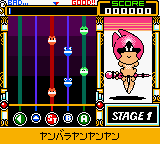
Once you select a song or mode, the rhythm game begins. Notes scroll from the top of the screen downward. When a note reaches the target area at the bottom, you must press the matching button (A/X, B/S, or a D-pad direction) at the right moment. Timing matters: hitting exactly on beat gives a "Perfect" or "Great" rating, while early or late presses yield lower scores. Your goal is to survive the song without missing too many notes. The game tracks your performance with a gauge that depletes on missed notes.
If you fail a song, you may be given the option to retry or return to the song select screen. There is usually no continue system beyond that. Because the menus are in Japanese, you may need to experiment to find settings like sound mode (stereo vs. mono) or vibration (if playing on original hardware with a GB Pocket). For emulator use, the key mapping above will work right away.
CONTROLS
Controls
- Arrow Keys: D-Pad / Movement
- X: A button (jump / confirm)
- S: B button (run / attack / cancel)
- Enter: Start / Pause
- V: Select
Pop'n Music GB - Animation Melody FAQ
Who developed Pop'n Music GB - Animation Melody?
The game was developed and published by Konami, the company behind the Bemani series of rhythm games. It is a portable adaptation of their arcade Pop'n Music franchise.
Does Pop'n Music GB - Animation Melody have a multiplayer or co-op mode?
No, the Game Boy Color version is strictly a single-player experience. It does not support link cable or any form of multiplayer.
Can players save progress in Pop'n Music GB - Animation Melody?
The game uses a battery-backed save system. High scores and unlocked songs (if any) are retained when the console is turned off, as long as the internal battery is still functional.
You may also like
All Game Boy Color games











GAME INFO
- Platform
- Game Boy Color
- Genre
- Music
- Released
- 2000
- Players
- 1
- Region
- Japan
COMMENTS (0)
No comments yet. Be the first to share your thoughts.