The game loads when you press Play · press “Play Now” inside the game if it asks.
Pong - The Next Level (USA, Europe)
Pong - The Next Level
Pong - The Next Level Overview
- Game Boy Color
- Arcade
- 5· 0 votes
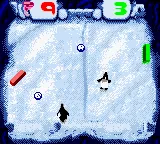
Pong: The Next Level on Game Boy Color is a portable take on the classic paddle-ball game, but with a twist that sets it apart from simple ports. Released in the USA and Europe for Nintendo's handheld, this version is notable for being the first video game to use artificial intelligence. That might sound strange for a Pong game, but it means the computer opponent learns and adapts to your playstyle rather than just following a fixed pattern. The Game Boy Color palette and simple visuals keep the focus on the core gameplay, while the AI claim gives it a unique spot in the system's library.
You control a paddle on one side of the screen, moving it up and down to return a bouncing ball toward your opponent. The goal is to score points by making the ball pass the AI's paddle. Matches play out in a best-of-points format, and the challenge increases as the AI adjusts its tactics. There are no power-ups or complex mechanics - just pure, responsive paddle-ball action with a learning opponent. You can also play a two-player mode using a link cable, turning it into a local versus match.
For retro gamers curious about early attempts at adaptive AI, this is a fascinating piece of Game Boy Color history. It's not a deep game by modern standards, but the claim of being first to use AI makes it worth a quick playthrough. The simplicity means anyone can pick it up, and the adaptive opponent keeps each rally unpredictable. If you enjoy classic Pong with a twist, this is a neat curiosity that fits right in with the system's sports and arcade titles.
You control a paddle on one side of the screen, moving it up and down to return a bouncing ball toward your opponent. The goal is to score points by making the ball pass the AI's paddle. Matches play out in a best-of-points format, and the challenge increases as the AI adjusts its tactics. There are no power-ups or complex mechanics - just pure, responsive paddle-ball action with a learning opponent. You can also play a two-player mode using a link cable, turning it into a local versus match.
For retro gamers curious about early attempts at adaptive AI, this is a fascinating piece of Game Boy Color history. It's not a deep game by modern standards, but the claim of being first to use AI makes it worth a quick playthrough. The simplicity means anyone can pick it up, and the adaptive opponent keeps each rally unpredictable. If you enjoy classic Pong with a twist, this is a neat curiosity that fits right in with the system's sports and arcade titles.
GAME INFO
- Platform
- Game Boy Color
- Genre
- Arcade
- Players
- 1-2
- Region
- USA, Europe
How to play Pong - The Next Level online
Section 2 - Getting Started: When you launch Pong: The Next Level, you'll see a simple title screen. Press Start to begin. The first decision is usually between single-player (vs. the AI) or two-player (using a link cable). Select single-player for practice.The core loop is straightforward: a ball appears in the center, then moves toward one side. Your paddle is on the left or right, and you move it up and down with the D-Pad to intercept the ball. The AI opponent does the same on the other side. Each time the ball gets past your opponent, you score a point. The first to reach the target score wins the match.Pay attention to how the AI reacts - it may start slow but will get better as you play. There are no menus or settings to tweak beyond choosing the mode. Just move, hit, and score. If you're new to Pong, focus on positioning your paddle early, and don't chase the ball frantically - timing beats speed.
CONTROLS
Controls
- Arrow Keys: D-Pad / Movement
- X: A button (jump / confirm)
- S: B button (run / attack / cancel)
- Enter: Start / Pause
- V: Select
Pong - The Next Level FAQ
What makes Pong - The Next Level stand out among Game Boy Color titles of its era?
It claims to be the first video game to use artificial intelligence, with an opponent that learns from your play instead of following a fixed pattern. That makes it a unique experiment on a handheld from 1999, blending classic arcade simplicity with adaptive gameplay.
Which regions was Pong - The Next Level released in?
The game was released in both the United States and Europe on the Game Boy Color. There is no known Japanese release.
Who developed Pong - The Next Level?
The developer is not widely documented in accessible sources. It may have been produced by a studio under Atari or Infogrames, but no official credit is confirmed for this specific Game Boy Color version.
You may also like
All Game Boy Color games











GAME INFO
- Platform
- Game Boy Color
- Genre
- Arcade
- Players
- 1-2
- Region
- USA, Europe
COMMENTS (0)
No comments yet. Be the first to share your thoughts.