CHOOSE A VERSION
2 versions · same consoleChoose an original release, regional version, revision, bootleg or clearly labelled ROM hack/mod, then press Play. Hacks may change the gameplay. Switching versions restarts the player.
Selected: Default · English
The game loads when you press Play · press “Play Now” inside the game if it asks.
Pokemon Picross (English)
Pokemon Picross
Pokemon Picross on GBC
- Game Boy Color
- Action
- Translation
- 4.2· 1 votes
Unofficial fan translation. The notes below come from community sources and have not been verified against the patch itself, so levels, mechanics and features may differ from what is described.
Pokemon Picross is a puzzle game for the Game Boy Color that mashes together the Picross (nonogram) formula with Pokemon. It originally came out in Japan back in 1999, developed by Jupiter Corporation and published by Nintendo, though it never saw an official release outside of Japan. What you are playing here is a fan-made English translation, patched onto the original Japanese ROM, so those of us who can't read Japanese can finally play through it without a guide.
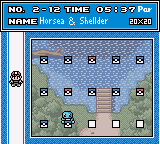
You solve nonogram puzzles by filling in squares on a numbered grid. The numbers along the rows and columns tell you how many consecutive filled squares belong there, and you have to figure out exactly which squares to mark. Every completed puzzle reveals a hidden picture of a Pokemon. There are a bunch of Pokemon to unlock, and as you progress, the puzzles get bigger and more complex. The game keeps track of your time and mistakes, so you can try to perfect your solve.
If you enjoy Picross games like Mario's Picross or Picross 3D, this one is a fun little addition, but it's definitely a niche title. The Pokemon theming gives it some charm, and the translation quality is solid, so it's worth grabbing if you want more classic puzzle gameplay. Just keep in mind it's a relatively simple and short game, not some lost epic.
GAME INFO
- Platform
- Game Boy Color
- Genre
- Action
How to play Pokemon Picross online
Section 2 - Getting Started: This is a translation of a Japanese-only GBC game, so the menus are now in English, which is a huge help. When you boot it up, you'll see a title screen with options like New Game, Continue, and maybe a puzzle editor. The main loop is straightforward: pick a puzzle from the list, and solve it by using the D-Pad to move the cursor on the grid. Press the A button (X on keyboard) to fill in a square and the B button (S on keyboard) to mark an X if you know a spot is empty. The numbers on the edges are your clues; they work exactly like standard Picross logic. If you make a mistake by filling the wrong square, you'll lose health, and if you run out, it's game over for that puzzle. You can save your progress at the menu between puzzles.
CONTROLS
Controls
- Arrow Keys: D-Pad / Movement
- X: A button (jump / confirm)
- S: B button (run / attack / cancel)
- Enter: Start / Pause
- V: Select
You may also like
All Game Boy Color games











GAME INFO
- Platform
- Game Boy Color
- Genre
- Action
COMMENTS (0)
No comments yet. Be the first to share your thoughts.