The game loads when you press Play · press “Play Now” inside the game if it asks.
Pocket Smash Out (Europe) (Unl)
Pocket Smash Out
Pocket Smash Out: GBC Arcade
- Game Boy Color
- Arcade
- Unlicensed
- 5· 0 votes
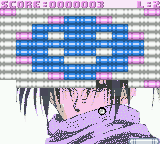
Playing Pocket Smash Out means controlling a paddle at the bottom of the screen to deflect a ball upward into a grid of bricks. Each brick requires one or more hits to break, and missing the ball costs you a life. The core loop never changes: aim and time your shots, catch power-ups that may widen the paddle or multiply balls, and survive until every brick is destroyed. The game offers a basic level progression, ramping up brick patterns and ball speed as you advance.
As an unlicensed cartridge, Pocket Smash Out lacks the polish of official Nintendo releases, but it captures the simple, addictive pick-up-and-play feel that made breakout clones popular on portable systems. If you enjoy classic brick-breakers, this is a decent example of what small developers could squeeze onto a Game Boy Color cart without licensing fees. It remains a niche curiosity rather than a standout title, but that very obscurity makes it a fun piece of retro history to try in an emulator.
GAME INFO
- Platform
- Game Boy Color
- Genre
- Arcade
- Players
- 1
- Region
- Europe
How to play Pocket Smash Out online
Getting Started
Pocket Smash Out is a straightforward breakout clone. Press Start (Enter) at the title screen to begin. You control a paddle at the bottom using the Arrow Keys - left and right. The ball bounces automatically off the paddle and walls. Your goal is to break every brick on the screen without letting the ball fall below the paddle.
The game gives you a fixed number of lives (usually three). Each time the ball drops, you lose one. Power-ups occasionally drop from broken bricks: catch them to enlarge your paddle, increase ball speed, or get a second ball. There is no story or characters - the entire experience revolves around clearing waves of bricks. The difficulty increases after each cleared stage as brick patterns get denser and the ball moves faster.
If you are new to breakout games, focus on keeping the ball high by nudging the paddle to its swing. Hitting the ball with the edge of the paddle changes its arc, so you can aim for hard‑to‑reach bricks. There is no pause in the emulator by default, but you can suspend the game by pressing the Select (V) key to bring up an options menu if available. The game offers no save feature, so finish a session in one sitting.
CONTROLS
Controls
- Arrow Keys: D-Pad / Movement
- X: A button (jump / confirm)
- S: B button (run / attack / cancel)
- Enter: Start / Pause
- V: Select
Pocket Smash Out FAQ
Is Pocket Smash Out an official release, a fan hack, a prototype, or another kind of build?
It is an unlicensed commercial release, not a hack or prototype. The cartridge was sold without Nintendo's approval, typically by small manufacturers targeting the European market in the late 1990s.
Does Pocket Smash Out have a multiplayer or co-op mode?
No multiplayer or co-op mode exists. The game is strictly single‑player, following the standard breakout formula where one player controls the paddle alone.
Roughly how long does it take to finish Pocket Smash Out?
A single playthrough can be completed in about 15 to 25 minutes, depending on skill and the number of lives lost. The game has no save function, so it is intended to be finished in one sitting.
You may also like
All Game Boy Color games











GAME INFO
- Platform
- Game Boy Color
- Genre
- Arcade
- Players
- 1
- Region
- Europe
COMMENTS (0)
No comments yet. Be the first to share your thoughts.