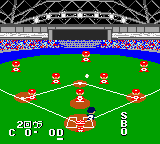
The game loads when you press Play · press “Play Now” inside the game if it asks.
Pocket Pro Yakyuu (Japan)
Pocket Pro Yakyuu
Getting to Know Pocket Pro Yakyuu
- Game Boy Color
- Sports
- 5· 0 votes
GAME INFO
- Platform
- Game Boy Color
- Genre
- Sports
- Region
- Japan
How to play Pocket Pro Yakyuu online
Getting Started
When you first boot up Pocket Pro Yakyuu, you'll be greeted by a Japanese title screen. Press Start (Enter) to advance. The main menu likely offers options like "Exhibition Game," "Season Mode," or "Options." Since menus are in Japanese, you may need to experiment or refer to a translation guide. The first option is usually the standard game mode - select it with the A button (X key).
The core loop of Pocket Pro Yakyuu is playing a full baseball game. You'll alternate between batting and fielding each half-inning. When batting, press A to swing the bat at the right moment. When pitching, use the D-Pad to aim and press A to throw a selected pitch (the pitch type may be indicated by a Japanese label). On defense, the D-Pad moves your fielder, and pressing A throws the ball to a base. Timing and accuracy are crucial.
A helpful hint: in baseball games of this era, pressing and holding A during batting often charges a power swing, though this varies between titles. Pay attention to the pitcher's windup and the ball speed indicator. If you lose a game, you can restart from the menu. The game doesn't save progress in exhibition mode, but season mode (if present) may use a save password or battery backup. Since this is a Japanese-only release, expect all on-screen text to be in Japanese, but the gameplay itself is intuitive if you know baseball rules.
CONTROLS
Controls
- Arrow Keys: D-Pad / Movement
- X: A button (jump / confirm)
- S: B button (run / attack / cancel)
- Enter: Start / Pause
- V: Select
Pocket Pro Yakyuu FAQ
Who developed Pocket Pro Yakyuu?
The specific developer of Pocket Pro Yakyuu is not widely documented in English sources. It was likely handled by a small Japanese studio known for portable sports games, but no verified name is readily available.
Roughly how long does it take to finish Pocket Pro Yakyuu?
A single nine-inning game lasts about 20 - 30 minutes. If a season mode exists, completing a full season of multiple games could take several hours, but the main objective - playing through individual games - can be done in short sessions.
Is Pocket Pro Yakyuu an official release, a fan hack, a prototype, or another kind of build?
It is an official commercial release for the Game Boy Color, sold in Japan. It is not a fan hack, prototype, or homebrew project.
You may also like
All Game Boy Color games











GAME INFO
- Platform
- Game Boy Color
- Genre
- Sports
- Region
- Japan
COMMENTS (0)
No comments yet. Be the first to share your thoughts.