The game loads when you press Play · press “Play Now” inside the game if it asks.
Pocket Music (Europe) (En,Fr,De,Es,It)
Pocket Music
About Pocket Music
- Game Boy Color
- Music
- 5· 0 votes
Pocket Music is a music creation tool for the Game Boy Color, released in Europe with support for English, French, German, Spanish, and Italian. It hit shelves around 1999, though the exact developer and publisher aren't widely documented. This is an official commercial release, not a hack or homebrew, and it turns Nintendo's handheld into a portable sequencer.
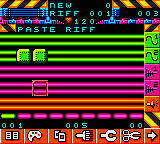
Instead of playing predefined songs, you build your own by placing notes on a grid using the D-Pad and buttons. The interface is stripped down to fit the Game Boy screen, offering a selection of instruments, tempo control, and a pattern-based composition system. You can save your creations and playback your compositions on the go.
For retro music enthusiasts, Pocket Music is a fascinating curio. It's far from a full DAW, but its limitations make it a charming and creative tool. Compared to other GBC music games like *Music 2000* or the *Korg DS-10* on later hardware, it's simpler but still rewarding for anyone curious about chiptune on original hardware.
GAME INFO
- Platform
- Game Boy Color
- Genre
- Music
- Developer
- Jester Interactive
- Players
- 1
- Region
- Europe
How to play Pocket Music online
When you start Pocket Music, you'll see a title screen then a menu for loading or creating a new song. Use the D-Pad to navigate the small grid and confirm with the A button. The core loop involves selecting a track, adding notes in a step sequencer, adjusting pitch and instrument for each step, then pressing play to hear your work.
New players should start with the demo song to understand the interface layout. The controls are mostly intuitive: D-Pad moves the cursor, A toggles a note on/off, B clears, and Start toggles play/pause. There's no tutorial built in, so experiment with the few instrument slots and tempo slider to get a feel for the limited but intentionally restrictive palette.
CONTROLS
Controls
- Arrow Keys: D-Pad / Movement
- X: A button (jump / confirm)
- S: B button (run / attack / cancel)
- Enter: Start / Pause
- V: Select
Pocket Music FAQ
Is Pocket Music an official release, a fan hack, a prototype, or another kind of build?
It is an official, commercially released Game Boy Color title. It was manufactured and sold at retail in Europe, not a fan project, prototype, or unlicensed cartridge.
Which regions was Pocket Music released in?
The game saw a European release specifically, as indicated by the mult-language support and label. No Japan or North American versions are known to exist.
Is Pocket Music exclusive to Game Boy Color or did it appear on other systems?
Pocket Music was only produced for the Game Boy Color. It did not receive ports to any other home console or handheld.
You may also like
All Game Boy Color games











GAME INFO
- Platform
- Game Boy Color
- Genre
- Music
- Developer
- Jester Interactive
- Players
- 1
- Region
- Europe
COMMENTS (0)
No comments yet. Be the first to share your thoughts.