The game loads when you press Play · press “Play Now” inside the game if it asks.
Pocket Color Billiards (Japan)
Pocket Color Billiards
About Pocket Color Billiards
- Game Boy Color
- Sports
- 5· 0 votes
GAME INFO
- Platform
- Game Boy Color
- Genre
- Sports
- Region
- Japan
How to play Pocket Color Billiards online
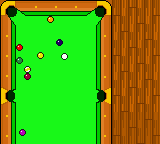
Since Pocket Color Billiards is a Japanese-only release, its menus are entirely in Japanese. When you first boot the game, you'll likely see a title screen with options like "ゲームスタート" (start game) and "オプション" (options). Use the D-pad to highlight your choice and press X to confirm. The core loop is simple: pick a game mode (usually single-player versus a computer opponent or a two-player mode if you have a link cable), then take turns potting balls. Aim your cue by moving a crosshair with the D-pad, adjust the power with a meter using the A or B button, then press X again to shoot. You can apply spin by moving the cue ball aim before confirming, a standard feature in pool games. If you don't read Japanese, trial and error should get you through a match fairly quickly because billiards controls are consistent across many titles.
CONTROLS
Controls
- Arrow Keys: D-Pad / Movement
- X: A button (jump / confirm)
- S: B button (run / attack / cancel)
- Enter: Start / Pause
- V: Select
Pocket Color Billiards FAQ
Who developed Pocket Color Billiards?
The developer of Pocket Color Billiards is not widely documented. Most sources simply list it as an uncredited Japanese Game Boy Color release, so the studio behind it remains unclear.
Is there anything iconic or memorable about Pocket Color Billiards?
Nothing particularly iconic stands out; it's a straightforward pool simulation that does what it promises on a handheld. Its rarity as a Japan-exclusive cartridge gives it some curiosity value among collectors, but it doesn't introduce any unique gimmicks or minigames.
What type of game is Pocket Color Billiards?
It is a sports simulation game centered on billiards. Players aim and shoot cue balls on a top-down table, following standard pool rules like eight-ball.
You may also like
All Game Boy Color games











GAME INFO
- Platform
- Game Boy Color
- Genre
- Sports
- Region
- Japan
COMMENTS (0)
No comments yet. Be the first to share your thoughts.