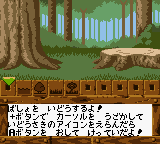
The game loads when you press Play · press “Play Now” inside the game if it asks.
Oide Rascal (Japan)
Oide Rascal
About Oide Rascal
- Game Boy Color
- Simulation
- 5· 0 votes
Oide Rascal is a Japan-exclusive Game Boy Color title that appears to be a virtual pet simulation. Released in 2000, its developer is not widely documented, but it was part of the late-era GBC library. The game likely carries the charming aesthetic common to portable pet sims of the time.
Players take care of a cute raccoon-like character, managing its needs through menu-driven interactions. The core loop involves feeding, playing, and cleaning, with a real-time clock influencing the pet's moods and health. The interface is entirely in Japanese, using icon-based navigation typical of the genre.
For collectors of niche Japan-only Game Boy Color games, Oide Rascal offers a faithful pet-raising experience with detailed sprite work. It's a straightforward example of the simulation genre on the platform, best suited for those who enjoy simple, routine-based gameplay without complex objectives.
GAME INFO
- Platform
- Game Boy Color
- Genre
- Simulation
- Released
- 2000
- Players
- 1
- Region
- Japan
How to play Oide Rascal online
Getting Started: When you start Oide Rascal, you'll be greeted by a title screen entirely in Japanese. Press Start to proceed to the main menu, where you'll see options like "はじめる" (start) and "つづき" (continue). Select "はじめる" to begin a new game; you may be prompted to name your pet using a hiragana input screen.
The core gameplay revolves around checking on your pet's status icons: hunger, happiness, hygiene, and energy. Use the D-Pad to move between different rooms or areas, then press X to interact. For example, feeding your pet opens a food selection submenu. Timing matters: your pet may refuse food if too full or become sick if left dirty.
Because all text is in Japanese, remember the positions of menu options. The back (B) button returns you to a previous screen, and Start pauses the game. The pet's needs change over real time, so check back often. If your pet becomes too unhappy or ill, you may need to restart. There is no manual save - use the in-game save feature (often in the pause menu) to preserve progress.
CONTROLS
Controls
- Arrow Keys: D-Pad / Movement
- X: A button (jump / confirm)
- S: B button (run / attack / cancel)
- Enter: Start / Pause
- V: Select
Oide Rascal FAQ
Is Oide Rascal exclusive to Game Boy Color or did it appear on other systems?
It was released only for Game Boy Color in Japan. No versions exist for other platforms, including the original Game Boy or international consoles.
Does Oide Rascal have a multiplayer or co-op mode?
The game is single-player only. There is no multiplayer or link cable functionality.
Who developed Oide Rascal?
The developer is not widely documented in English sources. The game was published by Imagineer, but the specific development studio remains unconfirmed.
You may also like
All Game Boy Color games











GAME INFO
- Platform
- Game Boy Color
- Genre
- Simulation
- Released
- 2000
- Players
- 1
- Region
- Japan
COMMENTS (0)
No comments yet. Be the first to share your thoughts.