CHOOSE A VERSION
2 versions · same consoleChoose an original release, regional version, revision, bootleg or clearly labelled ROM hack/mod, then press Play. Hacks may change the gameplay. Switching versions restarts the player.
Selected: Default · USA · USA
The game loads when you press Play · press “Play Now” inside the game if it asks.
Microsoft Entertainment Pack (USA)
Microsoft Entertainment Pack
About Microsoft Entertainment Pack
- Game Boy Color
- Puzzle
- 5· 0 votes
GAME INFO
- Platform
- Game Boy Color
- Genre
- Puzzle
- Released
- 2000
- Players
- 1
- Region
- USA
How to play Microsoft Entertainment Pack online
Getting Started
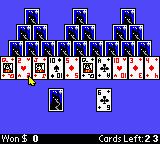
When you first boot up Microsoft Entertainment Pack, you are presented with a menu listing the six included puzzle games. Each game has its own objective and control scheme, so the first step is to pick one that catches your interest. The core loop is simple: you play a short session of a classic puzzle like a variant of Tetris, Minesweeper, or a card game, aiming for a high score or to complete a board.
Most games rely on quick thinking and pattern recognition rather than speed. For example, in a block-stacking game you rotate and place falling shapes to fill lines, while in a logic puzzle you uncover safe tiles by deduction. The button mappings double as confirm and cancel actions depending on the context. Since the instructions are minimal (they were adapted from the PC version), it helps to experiment with the D-pad and A/B buttons in each game to learn the rules.
There is no overarching story or campaign; the appeal is jumping between different puzzles for a few minutes at a time. If you get stuck, restarting a game is often just a button press away. This lack of a save system means each session is self-contained, perfect for quick plays during a commute or break.
CONTROLS
Controls
- Arrow Keys: D-Pad / Movement
- X: A button (jump / confirm)
- S: B button (run / attack / cancel)
- Enter: Start / Pause
- V: Select
Microsoft Entertainment Pack FAQ
Can players save progress in Microsoft Entertainment Pack?
Saving progress is not a feature of this compilation. Each game session stands alone, and high scores are typically displayed only until the console is turned off or the game is reset. No battery-backed save data is available for individual game states.
Is there anything iconic or memorable about Microsoft Entertainment Pack?
This Game Boy Color version is notable for bringing the well-known Windows puzzle suite to a portable device. It includes six of the ten games from the original PC pack, making it a nostalgic curiosity for anyone who whiled away hours on desktop versions of Tetris, Minesweeper, or similar classics.
Does Microsoft Entertainment Pack have a multiplayer or co-op mode?
No multiplayer or co-op modes are present. All six games are strictly single-player experiences, designed for one person to play alone. The focus is on personal high scores and solo puzzle solving.
You may also like
All Game Boy Color games











GAME INFO
- Platform
- Game Boy Color
- Genre
- Puzzle
- Released
- 2000
- Players
- 1
- Region
- USA
COMMENTS (0)
No comments yet. Be the first to share your thoughts.