The game loads when you press Play · press “Play Now” inside the game if it asks.
Merlin (Europe) (En,Fr,De,Es,It,Nl)
Merlin
Getting to Know Merlin
- Game Boy Color
- Platformer
- 5· 0 votes
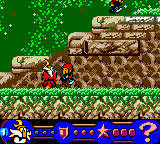
Merlin is a 2000 action platformer for the Game Boy Color, developed by French studio RFX Interactive and published in Europe by Light & Shadow Production alongside Electronic Arts. The game takes its name from the legendary wizard Merlin and drops you into a fantasy world full of enemies and obstacles. It launched exclusively on the GBC, a time when handheld platformers were a dime a dozen but this one brought a distinctly European art style and design sensibility to the small screen. The cartridge shipped with English, French, German, Spanish, Italian, and Dutch text, making it accessible across the continent.
You control Merlin through side-scrolling levels, jumping between platforms and using some form of attack to defeat creatures that cross your path. The core loop is classic platforming: move from left to right, avoid pitfalls, collect items such as potions or coins, and reach the level exit. The game throws a mix of grounded enemies and aerial threats at you, requiring precise jumps and timing. Power‑ups or special abilities may appear, but the exact mechanics aren't widely documented beyond the basic run‑and‑jump formula common to the era. Each level ends with a boss or a checkpoint before the next stage unfolds.
Merlin isn't a system seller, but it's a solid example of what European developers were doing on the Game Boy Color in 2000. The graphics are colourful and the controls are responsive enough for a pick‑up‑and‑play session. If you enjoyed other GBC platformers like Alone in the Dark: The New Nightmare or Toy Story 2, Merlin offers a similar experience with a magical twist. It's a niche title worth checking out for collectors of European GBC releases or anyone curious about how different regions interpreted the platformer genre on Nintendo's handheld.
GAME INFO
- Platform
- Game Boy Color
- Genre
- Platformer
- Publisher
- Electronic Arts
- Developer
- RFX Interactive
- Released
- 2000
- Players
- 1
- Region
- Europe
How to play Merlin online
When you first boot up Merlin you'll see a title screen with a few language options. Select your preferred language using the D‑Pad and press X to confirm. The game wastes no time dropping you into the first level. Your goal is straightforward: guide Merlin to the end of each stage by moving right, jumping over gaps, and attacking enemies that get in your way.
The core loop is simple but requires patience. Use the D‑Pad to move left or right, press X to jump, and press S to attack. Enemies come in different patterns - some walk back and forth, others hover in the air. Time your jumps carefully because touching most enemies hurts you. You have a health bar that depletes on contact, and you can restore it by collecting potions or other items scattered around the levels.
Don't rush headlong into unknown territory. Some platforms are hidden or break after a second, and there are bottomless pits that mean instant death. Memorize enemy placements and platform layouts as you progress. If you die, the game continues from the start of the current level, so practice makes perfect. The multi‑language text only appears in menus and brief story screens, so once you're in‑game the language choice doesn't affect gameplay.
CONTROLS
Controls
- Arrow Keys: D-Pad / Movement
- X: A button (jump / confirm)
- S: B button (run / attack / cancel)
- Enter: Start / Pause
- V: Select
Merlin FAQ
Does Merlin have a multiplayer or co-op mode?
Merlin is a single‑player only game. There is no support for multiplayer or cooperative play on the Game Boy Color.
What type of game is Merlin?
Merlin is a side‑scrolling action platformer. The player runs, jumps, and attacks through fantasy‑themed levels while avoiding enemies and hazards.
Is Merlin exclusive to Game Boy Color or did it appear on other systems?
Merlin was released only for the Game Boy Color. It did not appear on any other platform, including the original Game Boy or Nintendo's later handhelds.
You may also like
All Game Boy Color games











GAME INFO
- Platform
- Game Boy Color
- Genre
- Platformer
- Publisher
- Electronic Arts
- Developer
- RFX Interactive
- Released
- 2000
- Players
- 1
- Region
- Europe
COMMENTS (0)
No comments yet. Be the first to share your thoughts.