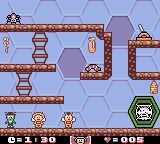
The game loads when you press Play · press “Play Now” inside the game if it asks.
Maya the Bee & Her Friends (Europe) (En,Fr,De,Es)
Maya the Bee & Her Friends
Getting to Know Maya the Bee & Her Friends
- Game Boy Color
- Platformer
- 5· 0 votes
Maya the Bee & Her Friends is a platformer that first came out in 1999 for the original Game Boy and Game Boy Color. It was developed by British studio Crawfish Interactive, a team known for several handheld titles during that era. This European release includes English, French, German, and Spanish language options, making it accessible to a wide audience. As the first video game based on the beloved children's character Maya the Bee, it aimed to bring her gentle adventures to life on Nintendo's portable systems.
GAME INFO
- Platform
- Game Boy Color
- Genre
- Platformer
- Released
- 1999
- Players
- 1
- Region
- Europe
How to play Maya the Bee & Her Friends online
Getting Started: When you start the game, you will see a title screen and a language selection (English, French, German, or Spanish) - pick your preferred language then press Start. The main menu offers options like New Game, Continue, and probably a high score table. Choose New Game to begin. You control Maya the Bee as she moves through side-scrolling levels filled with platforms, flowers, and enemies like spiders and caterpillars.
The core goal of each stage is to reach the exit, often located at the far right side. Along the way you can collect honey or other items to increase your score. Enemies can be avoided or sometimes defeated by jumping on them or using a specific action. The game has a simple health system - getting hit by an enemy or obstacle reduces your life bar, and if it empties you lose a life. The D-pad moves Maya left or right, while pressing the A button makes her jump. The B button might be used for a quick dash or to perform a special move depending on the context. Watch out for pits and spiky hazards, and use platforms to reach higher areas. The game saves progress automatically after completing certain levels (if using the saved game feature on cart, though in emulation you may need to use the save state).
CONTROLS
Controls
- Arrow Keys: D-Pad / Movement
- X: A button (jump / confirm)
- S: B button (run / attack / cancel)
- Enter: Start / Pause
- V: Select
Maya the Bee & Her Friends FAQ
Is Maya the Bee & Her Friends exclusive to Game Boy Color or did it appear on other systems?
It was released for both the original Game Boy and the Game Boy Color, so it works on either handheld. No other home console or computer versions exist.
In what year was Maya the Bee & Her Friends originally released?
The game first came out in 1999, during the late lifespan of the Game Boy and early days of the Game Boy Color.
Is there anything iconic or memorable about Maya the Bee & Her Friends?
As the first video game adaptation of the classic Maya the Bee character, it holds a special place for fans of the franchise. It was developed by Crawfish Interactive, a studio that created several other licensed handheld titles, giving it a certain nostalgic charm for collectors of European Game Boy releases.
You may also like
All Game Boy Color games











GAME INFO
- Platform
- Game Boy Color
- Genre
- Platformer
- Released
- 1999
- Players
- 1
- Region
- Europe
COMMENTS (0)
No comments yet. Be the first to share your thoughts.