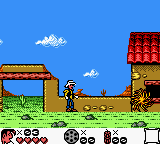
The game loads when you press Play · press “Play Now” inside the game if it asks.
Lucky Luke (USA) (En,Fr,De,Es)
Lucky Luke
About Lucky Luke
- Game Boy Color
- Action
- 5· 0 votes
GAME INFO
- Platform
- Game Boy Color
- Genre
- Action
- Publisher
- Coktel Vision
- Developer
- VD-dev
- Players
- 1
- Region
- USA
How to play Lucky Luke online
Getting Started
When you boot up Lucky Luke, you are greeted by a title screen. Press Enter (Start) to proceed to the main menu, where you can choose to start a new game or continue (if you have a saved file). Select a save slot and you begin in the first level, a dusty Western town. Your goal is to reach the end of the stage by moving right, using the Arrow Keys to run and jump, and pressing S (B button) to shoot your revolver at enemies.
The core loop is simple: traverse each level, avoid hazards like cacti and enemy bullets, and collect items for points and health. Some stages have secret areas or power-ups that give you extra lives or temporary invincibility. If you take damage, health pickups are scattered around. Dying sends you back to the start of the level, but you have unlimited continues. The game autosaves at checkpoints, so you can resume later.
New players should remember that pressing and holding S (B) while moving lets you run faster, which is useful for clearing wide gaps. Also, you can lock onto enemies by aiming with the D-Pad; the revolver fires straight ahead. Keep an eye on your ammo - it's plentiful but not infinite. Jumping over foes is sometimes safer than shooting them. The horse segments change the pace: while riding Jolly Jumper, you cannot jump but you move faster and can trample enemies.
CONTROLS
Controls
- Arrow Keys: D-Pad / Movement
- X: A button (jump / confirm)
- S: B button (run / attack / cancel)
- Enter: Start / Pause
- V: Select
Lucky Luke FAQ
Who developed Lucky Luke?
The development studio behind this Game Boy Color release is not widely documented in common databases. The game was published by Infogrames Europe, but the specific development team remains unclear.
Is there anything iconic or memorable about Lucky Luke?
The game faithfully adapts the look and feel of the classic comic series, featuring recognizable characters like Lucky Luke himself and his horse Jolly Jumper. Its chiptune soundtrack and sprite animations capture the lighthearted Western atmosphere of the source material.
What type of game is Lucky Luke?
It is a side-scrolling action platformer where players control Lucky Luke through linear levels, shooting bandits and avoiding environmental hazards. The core gameplay involves running, jumping, and timed shooting to progress through Wild West-themed stages.
You may also like
All Game Boy Color games











GAME INFO
- Platform
- Game Boy Color
- Genre
- Action
- Publisher
- Coktel Vision
- Developer
- VD-dev
- Players
- 1
- Region
- USA
COMMENTS (0)
No comments yet. Be the first to share your thoughts.