The game loads when you press Play · press “Play Now” inside the game if it asks.
Lucky Luke - Desperado Train (Europe) (En,Fr,De,Es,It,Nl)
Lucky Luke - Desperado Train
Lucky Luke - Desperado Train - Platformer Classic
- Game Boy Color
- Platformer
- 5· 0 votes
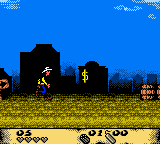
Lucky Luke - Desperado Train hit the Game Boy Color in Europe around 2001, published by Infogrames. It's a side-scrolling action game based on the classic Franco-Belgian comic series by Morris and René Goscinny. This European release includes support for English, French, German, Spanish, Italian, and Dutch, making it accessible across the region. The game puts you in the boots of the lonesome cowboy Lucky Luke as he tries to stop the Dalton brothers from pulling off a train heist.
The core gameplay is a straightforward platformer with shooting elements. You guide Lucky Luke from left to right through train cars and outdoor areas, jumping over obstacles, ducking under low ceilings, and shooting at enemies with his trusty revolver. The train itself serves as the main level backdrop, with moving platforms, swinging ropes, and occasional gaps to avoid. Each stage ends with a boss fight against one of the Daltons, requiring precise timing and pattern recognition. The controls are simple: jump, run, and shoot, with a few power-ups scattered around.
Today, Lucky Luke - Desperato Train is a decent example of a licensed tie-in that doesn't overstay its welcome. It's not a must-play classic, but it captures the humor and Western atmosphere of the comics fairly well for the hardware. Fans of the character or casual retro gamers looking for a short, forgiving platformer will find some fun here. It's also notable for its multi-language support, which was thoughtful for a European release. Just don't expect anything revolutionary - it's a solid genre piece from the tail end of the Game Boy Color's life.
GAME INFO
- Platform
- Game Boy Color
- Genre
- Platformer
- Players
- 1
- Region
- Europe
How to play Lucky Luke - Desperado Train online
Getting Started: Press Start on the title screen to begin. You'll see a level select map - pick the first stage (usually labeled "Level 1"). The game begins with Lucky Luke standing on a train platform. Your objective is to reach the end of the stage while avoiding or shooting enemies like bandits and birds. Use the D-Pad to move, X to jump over gaps and obstacles, and S to fire your gun. You can also hold S while moving to run, though this makes stopping trickier.
As you progress, watch for health pickups (often depicted as hearts) and ammunition crates. The game saves your progress via passwords - after completing a level, a password is displayed. Write it down or take a photo. To continue later, select "Password" on the main menu and enter it using the D-Pad and confirm button. Each boss fight requires learning attack patterns - the Daltons usually telegraph their moves, so dodge first, then shoot when they're vulnerable. The game is relatively short but offers a fair challenge for its era.
CONTROLS
Controls
- Arrow Keys: D-Pad / Movement
- X: A button (jump / confirm)
- S: B button (run / attack / cancel)
- Enter: Start / Pause
- V: Select
Lucky Luke - Desperado Train FAQ
Who developed Lucky Luke - Desperado Train?
Development credit is not widely documented for this specific Game Boy Color title. Infogrames published the game, but the actual studio behind the code remains unconfirmed in most online databases.
Is Lucky Luke - Desperado Train exclusive to Game Boy Color or did it appear on other systems?
Lucky Luke - Desperado Train was released only on the Game Boy Color. No ports or versions for other platforms have been officially documented.
Can players save progress in Lucky Luke - Desperado Train?
The game uses a password system to save progress. After completing a level, a series of letters and numbers appears on screen. Recording this password allows you to resume from that point later via the main menu's password option.
You may also like
All Game Boy Color games











GAME INFO
- Platform
- Game Boy Color
- Genre
- Platformer
- Players
- 1
- Region
- Europe
COMMENTS (0)
No comments yet. Be the first to share your thoughts.