The game loads when you press Play · press “Play Now” inside the game if it asks.
Lode Runner - Domudomu Dan no Yabou (Japan)
Lode Runner - Domudomu Dan no Yabou
Getting to Know Lode Runner - Domudomu Dan no Yabou
- Game Boy Color
- Platformer
- 5· 0 votes
GAME INFO
- Platform
- Game Boy Color
- Genre
- Platformer
- Released
- 2000
- Players
- 1
- Region
- Japan
How to play Lode Runner - Domudomu Dan no Yabou online
Getting Started
Because this is a Japanese-only release, all menus and text are in Japanese. When the game boots, you will see a title screen with options like Game Start, Continue, and Options. Use the D-Pad to highlight the top option and press Start or X to begin. There is no language toggle, so navigate by trial or refer to a translation guide online.
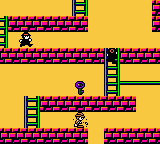
Each stage is a grid of platforms, ladders, and gold bars. Your goal is to collect all the gold while avoiding or trapping patrolling enemies. Pressing X (A button) lets you dig holes in the ground - enemies fall in and are temporarily disabled, but you can also fall in yourself if you're not careful. Move with the Arrow Keys, climb ladders by pressing up or down next to them, and plan your route carefully because the timer counts down continuously.
The core loop is straightforward: clear a stage by grabbing every gold piece, then advance to the next. Enemies respawn and learn from your movements, so you cannot just run around mindlessly. Experiment with digging patterns to trap enemies while you collect gold. If you get stuck, remember that you can jump over ladders and slide down ropes to reach lower areas quickly.
CONTROLS
Controls
- Arrow Keys: D-Pad / Movement
- X: A button (jump / confirm)
- S: B button (run / attack / cancel)
- Enter: Start / Pause
- V: Select
Lode Runner - Domudomu Dan no Yabou FAQ
Who developed Lode Runner - Domudomu Dan no Yabou?
The game was published by Banpresto, but the specific developer is not widely documented. It is a Japan-only Game Boy Color adaptation of the classic Lode Runner formula, likely handled by an internal or third-party studio under Banpresto's supervision.
Can players save progress in Lode Runner - Domudomu Dan no Yabou?
Yes, the game includes a password system for continuing your progress. After completing certain stages, a password is displayed that can be entered on the title screen to resume from that point. There is no battery-backed save, so passwords are the only method.
Roughly how long does it take to finish Lode Runner - Domudomu Dan no Yabou?
A typical playthrough of the main stages takes around 3 to 5 hours, depending on your familiarity with Lode Runner puzzles. The game includes 50+ levels, and later ones require careful planning, which can extend the time for less experienced players.
You may also like
All Game Boy Color games











GAME INFO
- Platform
- Game Boy Color
- Genre
- Platformer
- Released
- 2000
- Players
- 1
- Region
- Japan
COMMENTS (0)
No comments yet. Be the first to share your thoughts.