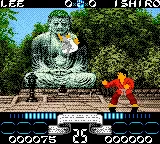
The game loads when you press Play · press “Play Now” inside the game if it asks.
International Karate 2000 (Europe)
International Karate 2000
What is International Karate 2000?
- Game Boy Color
- Fighting
- 5· 0 votes
GAME INFO
- Platform
- Game Boy Color
- Genre
- Fighting
- Released
- 1999
- Players
- 1-2
- Region
- Europe
How to play International Karate 2000 online
Getting Started
Fire up International Karate 2000 and you will land on a title screen. Press Start to move to the main menu where you can choose between single-player and link cable multiplayer. If you are playing alone, pick a fighter from the selection screen - each has different stats for speed and power. The core loop is a series of one-on-one matches: you fight through a roster of opponents, each getting harder as you progress.
In battle, you use the D-Pad to move, the A button for jump kicks or high attacks, and the B button for punches, low kicks, or blocks. Timing is key - the AI can be relentless, so do not mash buttons. Learn when to step back and when to lunge in. There is no story mode or minigame; it is pure arcade fighting, round after round until you lose or defeat all fighters.
If you have a friend with a copy and a link cable, two-player mode lets you face off directly. No special modes beyond that - just pick your fighter and go. There is no save feature, so any progress is lost when you turn off the Game Boy. You will need to beat the game in one sitting if you want to see the ending screen.
CONTROLS
Controls
- Arrow Keys: D-Pad / Movement
- X: A button (jump / confirm)
- S: B button (run / attack / cancel)
- Enter: Start / Pause
- V: Select
International Karate 2000 FAQ
Is there anything iconic or memorable about International Karate 2000?
It is a faithful remake of the original International Karate, a game that defined competitive one-on-one fighting on 8-bit computers. The addition of twelve fighters and new backgrounds gave the classic a fresh coat of paint for the Game Boy Color. The two-player link cable mode is also notable for bringing head-to-head fights to a handheld in 1999.
What makes International Karate 2000 stand out among Game Boy Color titles of its era?
Its straightforward approach to fighting - no combos, no power bars, just quick reflexive bouts - sets it apart from more complex fighters like Street Fighter. The game runs smoothly on the GBC hardware and retains the original's fast pace. The link cable support was also a rarity for fighting games on the platform.
Can players save progress in International Karate 2000?
The game does not include a save feature or password system. Like most fighting games of its time, you must finish the arcade ladder in one session. High scores are not retained either, so the only way to track accomplishments is by memory.
You may also like
All Game Boy Color games











GAME INFO
- Platform
- Game Boy Color
- Genre
- Fighting
- Released
- 1999
- Players
- 1-2
- Region
- Europe
COMMENTS (0)
No comments yet. Be the first to share your thoughts.