The game loads when you press Play · press “Play Now” inside the game if it asks.
Gem Gem Monster (Japan)
Gem Gem Monster
Inside Gem Gem Monster
- Game Boy Color
- Puzzle
- 5· 0 votes
GAME INFO
- Platform
- Game Boy Color
- Genre
- Puzzle
- Players
- 1
- Region
- Japan
How to play Gem Gem Monster online
Getting Started
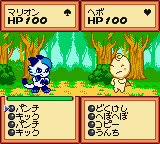
When you first boot up Gem Gem Monster, you'll see a title screen with Japanese text. Press Start (Enter) to proceed. The menu is likely in Japanese, but the game options are usually straightforward: a top option for a new game, maybe a continue option, and settings. Since this is a puzzle game, you'll soon find yourself looking at a playfield filled with colored gems. The core loop involves arranging or swapping gems to create matches of three or more, clearing them from the board while preventing the grid from filling up.
If the game includes a monster element, it might introduce obstacles or enemies that interfere with your progress. Use the D-Pad to navigate the cursor over the gem you want to move, then press the A button (X) to select and move it. The B button (S) may be used to cancel or activate a special ability, though without documentation, you'll need to experiment. Pay attention to the on-screen timer or scoring - most puzzle games of this era ramp up speed as you clear more rows. If you can't read the Japanese text, watch for symbols like a star for level progression or a skull for game over. Start with the first option and see where it takes you.
CONTROLS
Controls
- Arrow Keys: D-Pad / Movement
- X: A button (jump / confirm)
- S: B button (run / attack / cancel)
- Enter: Start / Pause
- V: Select
Gem Gem Monster FAQ
Can players save progress in Gem Gem Monster?
It's not widely documented whether Gem Gem Monster includes a save feature. Many Game Boy Color puzzle games relied on password systems or battery-backed saves, but without official confirmation, you should assume progress may not persist between sessions. Emulator save states are a reliable workaround.
Is Gem Gem Monster considered easy to pick up or challenging?
The difficulty curve is not well recorded, but typical puzzle games from this era start simple and gradually increase speed or complexity. First-time players should find the initial levels forgiving, though the Japanese menus might require some guesswork. Later stages likely demand fast pattern recognition and quick reflexes.
Who developed Gem Gem Monster?
The developer of Gem Gem Monster is not clearly documented. It may have been produced by a small Japanese studio or as a licensed product for a minor publisher. Without a confirmed source, it's best to treat the development team as unknown.
You may also like
All Game Boy Color games











GAME INFO
- Platform
- Game Boy Color
- Genre
- Puzzle
- Players
- 1
- Region
- Japan
COMMENTS (0)
No comments yet. Be the first to share your thoughts.