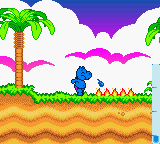
The game loads when you press Play · press “Play Now” inside the game if it asks.
Geheimnis der Happy Hippo-Insel, Das (Germany)
Geheimnis der Happy Hippo-Insel, Das
What is Geheimnis der Happy Hippo-Insel, Das?
- Game Boy Color
- Adventure
- 5· 0 votes
GAME INFO
- Platform
- Game Boy Color
- Genre
- Adventure
- Region
- Europe
How to play Geheimnis der Happy Hippo-Insel, Das online
Getting started: Upon loading the game, you likely start on a title screen where pressing Start or a button advances to the main menu. Since this is a German release, all on-screen text is in German. Look for options like "Neues Spiel" (New Game) or "Laden" (Load) if supported. The game probably presents an introductory screen or brief story setup before placing your character on the island.
The core gameplay revolves around exploring the island, examining objects, and interacting with characters to uncover the island's secret. Use the D-Pad to move, the A button (X key) to confirm actions or examine items, and the B button (S key) to cancel or back out of menus. Expect a mix of simple puzzles and dialogue exchanges. If you get stuck, try interacting with everything on screen or revisiting areas after obtaining new items.
As this is a German-only title, players unfamiliar with the language may need to rely on context clues and trial-and-error. The adventure genre on Game Boy Color often uses straightforward navigation and minimal text, so the gameplay should remain accessible even without full language comprehension. Save mechanics, if present, might require finding a save point or using a password system.
CONTROLS
Controls
- Arrow Keys: D-Pad / Movement
- X: A button (jump / confirm)
- S: B button (run / attack / cancel)
- Enter: Start / Pause
- V: Select
Geheimnis der Happy Hippo-Insel, Das FAQ
Does Geheimnis der Happy Hippo-Insel, Das have a multiplayer or co-op mode?
Most Game Boy Color adventure games of this era are single-player only, and this title is no exception. No documentation or ROM data suggests any multiplayer functionality.
Is there anything iconic or memorable about Geheimnis der Happy Hippo-Insel, Das?
The game is primarily remembered for its obscure German-language release and its association with the "Happy Hippo" brand, which may tie into a local media franchise. Its simple island exploration puzzles and colorful pixel art fit the typical late-90s handheld adventure style.
Is Geheimnis der Happy Hippo-Insel, Das considered easy to pick up or challenging?
Based on the game's target audience and genre conventions, it is likely designed for younger players and thus leans toward the easier side. Puzzles are generally straightforward, and the game may be completable in a few hours without excessive difficulty.
You may also like
All Game Boy Color games











GAME INFO
- Platform
- Game Boy Color
- Genre
- Adventure
- Region
- Europe
COMMENTS (0)
No comments yet. Be the first to share your thoughts.