The game loads when you press Play · press “Play Now” inside the game if it asks.
Elmo's ABCs (USA)
Elmo's ABCs
Elmo's ABCs: GBC Educational
- Game Boy Color
- Educational
- 5· 0 votes
GAME INFO
- Platform
- Game Boy Color
- Genre
- Educational
- Released
- 1999
- Players
- 1
- Region
- USA
How to play Elmo's ABCs online
Getting Started
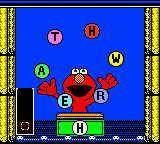
When you boot up Elmo's ABCs, you are met with a simple menu that asks you to pick a letter or activity. The game is all about recognizing letters and associating them with words and sounds. Use the D-Pad to highlight a letter on the alphabet grid, then press the A button (X key) to select it. From there, a short mini-game or animation plays that reinforces the letter's name and a word that starts with that letter.
The core loop involves cycling through the alphabet, completing each letter's activity, and being rewarded with cheerful feedback from Elmo. There is no fail state; the game is designed for exploration and repetition. If you get stuck, pressing the B button (S key) often backs out of a screen or cancels an action. The controls are extremely simple, making it accessible even for toddlers who are just learning to hold a Game Boy Color.
CONTROLS
Controls
- Arrow Keys: D-Pad / Movement
- X: A button (jump / confirm)
- S: B button (run / attack / cancel)
- Enter: Start / Pause
- V: Select
Elmo's ABCs FAQ
Who developed Elmo's ABCs?
The developer of Elmo's ABCs is not widely documented in common retro gaming databases. It was likely contracted by NewKidCo or a similar publisher specializing in children's software for the Game Boy Color, but no specific studio is credited in most available sources.
Is there anything iconic or memorable about Elmo's ABCs?
This title is memorable mostly as a product of the Sesame Street licensing machine, not for innovative gameplay. For fans of the character, seeing Elmo on a Game Boy Color cartridge might trigger nostalgia, but the game itself is a very basic educational tool with minimal lasting appeal.
Is Elmo's ABCs exclusive to Game Boy Color or did it appear on other systems?
Elmo's ABCs was released exclusively for the Game Boy Color. There is no known port or version for other platforms, though Sesame Street titles did appear on multiple systems around the same era.
You may also like
All Game Boy Color games











GAME INFO
- Platform
- Game Boy Color
- Genre
- Educational
- Released
- 1999
- Players
- 1
- Region
- USA
COMMENTS (0)
No comments yet. Be the first to share your thoughts.