The game loads when you press Play · press “Play Now” inside the game if it asks.
Doraemon Memories - Nobita no Omoide Daibouken (Japan)
Doraemon Memories - Nobita no Omoide Daibouken
What is Doraemon Memories - Nobita no Omoide Daibouken?
- Game Boy Color
- Adventure
- 5· 0 votes
GAME INFO
- Platform
- Game Boy Color
- Genre
- Adventure
- Players
- 1
- Region
- Japan
How to play Doraemon Memories - Nobita no Omoide Daibouken online
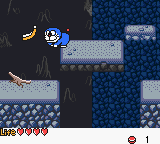
The game is an adventure platformer where you control Nobita through various levels, likely collecting items and solving puzzles. Since the game is entirely in Japanese, menus and dialogue may be a barrier if you do not read the language. However, most gameplay is straightforward: move with the D-Pad, interact with objects or characters using the A button (X key), and cancel or back out with the B button (S key). The core loop involves exploring each stage, finding memorabilia or triggering story events, and advancing through an episodic narrative typical of Doraemon games.
If you get stuck, look for gadgets from Doraemon's pocket - they often open new paths or solve environmental puzzles. The game expects you to talk to NPCs and examine everything, so be thorough. Because this is a Japanese-only release, you may need to rely on trial and error or online guides to understand specific objectives if the language is unfamiliar. Save data can be managed with the Start button on the title screen. Enjoy the nostalgic music and simple, cheerful visuals that capture the series' charm.
CONTROLS
Controls
- Arrow Keys: D-Pad / Movement
- X: A button (jump / confirm)
- S: B button (run / attack / cancel)
- Enter: Start / Pause
- V: Select
Doraemon Memories - Nobita no Omoide Daibouken FAQ
Who developed Doraemon Memories - Nobita no Omoide Daibouken?
The developer of this specific Game Boy Color title is not widely documented. It was likely produced by a Japanese company under license from the Doraemon rights holders, but the official studio credits have not been commonly preserved online.
Is there anything iconic or memorable about Doraemon Memories - Nobita no Omoide Daibouken?
As a Doraemon game, it naturally features the recognizable cast of characters and the signature gadgets from the series. The memory-themed adventure concept sets it apart from action-heavy Doraemon spin-offs, focusing on exploration and nostalgia.
Roughly how long does it take to finish Doraemon Memories - Nobita no Omoide Daibouken?
The exact playtime is not widely documented. However, based on similar Doraemon GBC titles, a single playthrough likely falls in the range of four to six hours, depending on reading speed and exploration.
You may also like
All Game Boy Color games











GAME INFO
- Platform
- Game Boy Color
- Genre
- Adventure
- Players
- 1
- Region
- Japan
COMMENTS (0)
No comments yet. Be the first to share your thoughts.