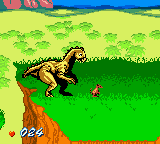
The game loads when you press Play · press “Play Now” inside the game if it asks.
Dinosaur'us (Europe) (En,Fr,De,Es,It,Nl)
Dinosaur'us
Dinosaur'us: GBC Action
- Game Boy Color
- Action
- 5· 0 votes
GAME INFO
- Platform
- Game Boy Color
- Genre
- Action
- Publisher
- Electronic Arts
- Developer
- RFX Interactive
- Released
- 2001
- Region
- Europe
How to play Dinosaur'us online
Getting Started
When you load up Dinosaur'us, you will probably see a title screen with language options. Use the D-Pad to highlight your preferred language (English, French, German, Spanish, Italian, or Dutch) and press the A button (X key) to confirm. After that, you should get a main menu where you can start a new game or possibly adjust settings. The interface is simple, with text rather than complex icons, so navigating should be straightforward.
The core gameplay loop likely involves moving a character through side-scrolling or top-down levels. Use the D-Pad to move, the A button to jump or interact, and the B button for any special action like attacking or dashing. Since the game's manual is not widely available, expect to learn the rules by trial and error. Pay attention to on-screen prompts or visual feedback when you press buttons.
If you get stuck, remember that many Game Boy Color games of this era rely on simple objective - reach the end of a stage, collect items, or defeat all enemies. The multi-language support means that if one language is unclear, you can restart and select another to get more understandable prompts. There is no widely documented walkthrough, so exploring carefully is your best bet.
CONTROLS
Controls
- Arrow Keys: D-Pad / Movement
- X: A button (jump / confirm)
- S: B button (run / attack / cancel)
- Enter: Start / Pause
- V: Select
Dinosaur'us FAQ
Who developed Dinosaur'us?
The development studio behind Dinosaur'us is not widely documented in public databases or retro gaming archives. No specific company or individual is consistently credited for this European exclusive release.
Roughly how long does it take to finish Dinosaur'us?
Exact completion time is not well recorded. Based on the typical length of simple action games on the Game Boy Color, a playthrough might last between one and two hours, but this is an estimate rather than a verified fact.
Is there anything iconic or memorable about Dinosaur'us?
Its notability comes mostly from being a European-exclusive Game Boy Color title with support for six languages. It is not considered a landmark game, but it stands out as a rare regional release that collectors and emulation enthusiasts seek out.
You may also like
All Game Boy Color games











GAME INFO
- Platform
- Game Boy Color
- Genre
- Action
- Publisher
- Electronic Arts
- Developer
- RFX Interactive
- Released
- 2001
- Region
- Europe
COMMENTS (0)
No comments yet. Be the first to share your thoughts.