The game loads when you press Play · press “Play Now” inside the game if it asks.
Dance Dance Revolution GB (Japan)
Dance Dance Revolution GB
Inside Dance Dance Revolution GB
- Game Boy Color
- Music
- 5· 0 votes
GAME INFO
- Platform
- Game Boy Color
- Genre
- Music
- Released
- 1999
- Players
- 1
- Region
- Japan
How to play Dance Dance Revolution GB online
Getting Started
After the title screen, press Start to enter the menu. Use the D-pad to highlight an option and press the A-mapped key (X) to confirm. The main menu lets you choose a song from a short list of unlockable tracks. You can also adjust the speed or arrow fade settings, though all menus are in Japanese - trial and error works for navigation.
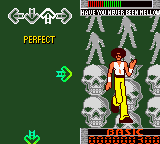
The core loop is simple: arrows scroll upward from the bottom of the screen. When they reach the target zone at the top, press the corresponding direction on the D-pad or tap the finger pad's buttons. The finger pad mimics a dance mat's four arrows, but you can also use the standard Game Boy buttons if the pad is missing. Timing matters - "Perfect", "Great", "Good", "Boo", or "Miss" grades affect your life bar. Survive until the song ends to clear.
Because this is a Japanese import, the song titles and interface text are in Japanese. Memorize menu positions: the first item is usually "Song Select", the second "Options", and the third "High Scores". Practicing on slower speeds helps build rhythm before tackling harder charts. The finger pad adds a tactile challenge, but many players find the D-pad more precise for this port.
CONTROLS
Controls
- Arrow Keys: D-Pad / Movement
- X: A button (jump / confirm)
- S: B button (run / attack / cancel)
- Enter: Start / Pause
- V: Select
Dance Dance Revolution GB FAQ
Who developed Dance Dance Revolution GB?
Konami developed the game internally, though the specific division or team behind this handheld version is not widely documented. The arcade DDR team likely oversaw the port.
Does Dance Dance Revolution GB have a multiplayer or co-op mode?
No multiplayer or co-op mode exists in this release. It is strictly a single-player experience using the bundled finger pad or standard controls.
Is there anything iconic or memorable about Dance Dance Revolution GB?
The bundled finger pad accessory is what makes this entry stand out - a rare attempt to replicate a dance mat on a handheld. It also served as the debut of the DDR series on Nintendo portable hardware, predating later DS and PSP iterations.
You may also like
All Game Boy Color games











GAME INFO
- Platform
- Game Boy Color
- Genre
- Music
- Released
- 1999
- Players
- 1
- Region
- Japan
COMMENTS (0)
No comments yet. Be the first to share your thoughts.