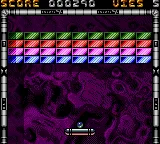
The game loads when you press Play · press “Play Now” inside the game if it asks.
Cool Bricks (Europe) (En,Fr,De,Es,It)
Cool Bricks
Cool Bricks Overview
- Game Boy Color
- Puzzle
- 5· 0 votes
GAME INFO
- Platform
- Game Boy Color
- Genre
- Puzzle
- Released
- 1999
- Players
- 1
- Region
- Europe
How to play Cool Bricks online
Getting Started
When you first boot up Cool Bricks, you'll see a title screen. Press Start to move to the menu, then use the D-Pad to pick a mode if there are multiple options. On most puzzle games of this era, you can choose between a single-player mode and maybe a two-player mode if you have a link cable. Select your option and press the confirm button (X). The core objective is simple: clear bricks from the playfield by matching them. You can swap adjacent bricks by selecting one with the cursor and pressing the B button to swap with a neighbor. The game might have a timer or a rising floor, so don't dawdle. Keep an eye on the upcoming bricks and plan your moves ahead. If you get stuck, try focusing on clearing the bottom rows first to prevent the pile from reaching the top. There's no special trick beyond good old pattern recognition. Enjoy the chunky pixel art and the relaxing (or stressful, depending on your pace) gameplay that was typical for GBC puzzle releases.CONTROLS
Controls
- Arrow Keys: D-Pad / Movement
- X: A button (jump / confirm)
- S: B button (run / attack / cancel)
- Enter: Start / Pause
- V: Select
Cool Bricks FAQ
Is there anything iconic or memorable about Cool Bricks?
Cool Bricks isn't a standout title like Tetris or Pokémon Puzzle League. Its main claim to fame is being a UK exclusive that supports five languages, which was unusual for a budget puzzle game on the Game Boy Color. Few modern retro collections have included it, so it remains a curiosity for collectors.
Which regions was Cool Bricks released in?
The game was only released in the United Kingdom. Despite supporting English, French, German, Spanish, and Italian text, it never officially made it to continental Europe or other regions.
Who developed Cool Bricks?
The developer of Cool Bricks is not widely documented. No studio name appears in surviving records or on the cartridge itself that can be reliably attributed. It was likely a small team or an outsourced project that didn't make much of a splash.
You may also like
All Game Boy Color games











GAME INFO
- Platform
- Game Boy Color
- Genre
- Puzzle
- Released
- 1999
- Players
- 1
- Region
- Europe
COMMENTS (0)
No comments yet. Be the first to share your thoughts.