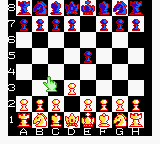
The game loads when you press Play · press “Play Now” inside the game if it asks.
Checkmate (Japan) (En,Ja)
Checkmate
Checkmate - Board Game Classic
- Game Boy Color
- Board Game
- 5· 0 votes
GAME INFO
- Platform
- Game Boy Color
- Genre
- Board Game
- Players
- 1-2
- Region
- Japan
How to play Checkmate online
Getting started is like any chess game. When you boot up, you'll likely see a menu offering new game, load, or options. Use the D-pad to highlight a choice and press X (A) to confirm. If the menu is in Japanese, look for the setting that lets you toggle language to English (usually an option with flags or text).
The core loop plays standard chess: white moves first, then you take turns moving pieces by highlighting them with the D-pad, pressing X to select, moving to a target square, and pressing X again to drop. The game will enforce legal moves and announce checks and checkmate. Expect a basic AI opponent with adjustable difficulty if the menu provides it. No special mechanics beyond the classic rules.
CONTROLS
Controls
- Arrow Keys: D-Pad / Movement
- X: A button (jump / confirm)
- S: B button (run / attack / cancel)
- Enter: Start / Pause
- V: Select
Checkmate FAQ
Who developed Checkmate?
The developer of Checkmate on Game Boy Color is not widely documented. No specific studio or individual is commonly credited for this title.
Is Checkmate considered easy to pick up or challenging?
As a standard chess game, it offers the same depth as the board game itself. Beginners can learn the rules, while experienced players will find the AI a reasonable opponent depending on the difficulty setting.
What type of game is Checkmate?
Checkmate is a board game simulation that recreates chess on the Game Boy Color. It belongs to the strategy and board game genre with no action or adventure elements.
You may also like
All Game Boy Color games

GAME INFO
- Platform
- Game Boy Color
- Genre
- Board Game
- Players
- 1-2
- Region
- Japan
COMMENTS (0)
No comments yet. Be the first to share your thoughts.