CHOOSE A VERSION
4 versions · same consoleChoose an original release, regional version, revision, bootleg or clearly labelled ROM hack/mod, then press Play. Hacks may change the gameplay. Switching versions restarts the player.
Selected: Default · USA · USA
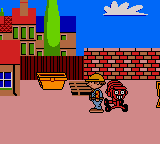
The game loads when you press Play · press “Play Now” inside the game if it asks.
Bob the Builder - Fix it Fun! (USA)
Bob the Builder - Fix it Fun!
Bob the Builder - Fix it Fun! on GBC
- Game Boy Color
- Educational
- 5· 0 votes
In Fix it Fun!, players take on the role of Bob the Builder and likely work through a series of small tasks like fixing objects, sorting materials, or completing short mini-games. The gameplay typically revolves around selecting correct tools or actions, following simple on-screen prompts, and rewarding the player with positive feedback. The Game Boy Color's hardware allowed for bright, pastel-toned graphics that match the show's aesthetic, making it easy for a young audience to follow along without frustration.
As a straightforward licensed product, Fix it Fun! isn't trying to break new ground or challenge experienced gamers. Its value lies in being a no-pressure, friendly experience for kids who already love the character. For retro enthusiasts, it's a decent snapshot of how television franchises were adapted for handhelds in the early 2000s, though it will feel very shallow to anyone without nostalgic ties to Bob the Builder.
GAME INFO
- Platform
- Game Boy Color
- Genre
- Educational
- Players
- 1
- Region
- USA
How to play Bob the Builder - Fix it Fun! online
Getting Started: When you first load up Bob the Builder: Fix it Fun!, the game will likely present a simple title screen followed by a main menu. Use the D-Pad to highlight options like 'Start' or 'New Game' and press the X button (A) to confirm. The game is designed for young children, so menus are straightforward and often accompanied by icons or pictures.
The core gameplay involves completing a series of tasks, each typically introduced by a short animation or text. You'll control Bob as he moves around a scene, interacts with objects, or selects tools from a menu. Most actions are carried out by pressing X to confirm or S to cancel/back out. The tasks are usually logic-based rather than timing-heavy, so take your time reading prompts.
A new player should expect a very gentle introduction. There are no game-over states, and mistakes are usually met with friendly encouragement. The game saves progress automatically after each completed stage, so you can turn off the system and come back later. If you get stuck, try interacting with every object on screen, as the solution is almost always visible and accessible with simple commands.
CONTROLS
Controls
- Arrow Keys: D-Pad / Movement
- X: A button (jump / confirm)
- S: B button (run / attack / cancel)
- Enter: Start / Pause
- V: Select
Bob the Builder - Fix it Fun! FAQ
Which regions was Bob the Builder - Fix it Fun! released in?
The game was released in the United States, as indicated by the (USA) in its title. European or Japanese releases are not documented for this particular version.
Is Bob the Builder - Fix it Fun! exclusive to Game Boy Color or did it appear on other systems?
Based on available records, Fix it Fun! appears to be exclusive to the Game Boy Color. There is no evidence of it being ported to other consoles or handhelds.
Does Bob the Builder - Fix it Fun! have a multiplayer or co-op mode?
No, the game is a single-player experience. It does not feature any multiplayer or cooperative play modes.
You may also like
All Game Boy Color games

GAME INFO
- Platform
- Game Boy Color
- Genre
- Educational
- Players
- 1
- Region
- USA
COMMENTS (0)
No comments yet. Be the first to share your thoughts.