The game loads when you press Play · press “Play Now” inside the game if it asks.
Barbie - Chasse au Tresor Sous-Marine (France)
Barbie - Chasse au Tresor Sous-Marine
Barbie - Chasse au Tresor Sous-Marine Overview
- Game Boy Color
- Platformer
- 5· 0 votes
Barbie - Chasse au Tresor Sous-Marine is a platformer for the Game Boy Color that was released in France. It's part of the wave of Barbie-themed games that hit the handheld during the early 2000s, aiming at younger players with simple controls and cute visuals. The exact developer and publisher aren't widely documented, but it fits the typical licensed game mold of that era.
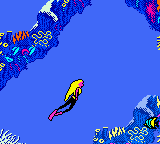
You control Barbie as she explores underwater stages looking for treasure. The gameplay involves side-scrolling movement, jumping over obstacles, and collecting items. There are enemies to avoid and probably a few puzzles to solve, though the mechanics stay light and forgiving. Most levels are straightforward, letting you focus on exploration rather than combat.
This isn't a groundbreaking game by any stretch, but it has a certain charm for collectors of Barbie merchandise or anyone curious about how licensed games handled the Game Boy Color hardware. It's short and simple, more of a curiosity than a must-play, but if you're into obscure European releases or just want a relaxing platformer, it's worth a quick look.
GAME INFO
- Platform
- Game Boy Color
- Genre
- Platformer
- Players
- 1
- Region
- Europe
How to play Barbie - Chasse au Tresor Sous-Marine online
Getting started is straightforward. Press Start to begin a new game. You'll see Barbie in an underwater level - move with the D-Pad and jump with the A button to avoid fish and collect pearls or treasure chests. The B button might let you pick up or interact with objects, though the exact function depends on the level.
The core loop is simple: run from left to right, collect items, and reach the end of each stage. There are no complex menus or inventory systems. If you see an enemy, just jump over it. The game is designed for younger players, so it's forgiving and doesn't require precise timing. Just explore each area and have fun swimming around.
CONTROLS
Controls
- Arrow Keys: D-Pad / Movement
- X: A button (jump / confirm)
- S: B button (run / attack / cancel)
- Enter: Start / Pause
- V: Select
Barbie - Chasse au Tresor Sous-Marine FAQ
Is there anything iconic or memorable about Barbie - Chasse au Tresor Sous-Marine?
Its most distinctive feature is the underwater setting and the French title, which gives it a unique flavor among Barbie games. Otherwise, it's a typical licensed platformer without standout moments that made it widely remembered.
Does Barbie - Chasse au Tresor Sous-Marine have a multiplayer or co-op mode?
No, the game is strictly single-player. There is no link cable support or any form of cooperative play.
Is Barbie - Chasse au Tresor Sous-Marine exclusive to Game Boy Color or did it appear on other systems?
This specific title appears to be exclusive to the Game Boy Color, and it was released only in the French region. It did not get ports to other consoles or handhelds.
You may also like
All Game Boy Color games











GAME INFO
- Platform
- Game Boy Color
- Genre
- Platformer
- Players
- 1
- Region
- Europe
COMMENTS (0)
No comments yet. Be the first to share your thoughts.