CHOOSE A VERSION
2 versions · same consoleChoose an original release, regional version, revision, bootleg or clearly labelled ROM hack/mod, then press Play. Hacks may change the gameplay. Switching versions restarts the player.
Selected: Default · USA · USA
The game loads when you press Play · press “Play Now” inside the game if it asks.
Austin Powers - Welcome to my Underground Lair! (USA)
Austin Powers - Welcome to my Underground Lair!
What is Austin Powers - Welcome to my Underground Lair!?
- Game Boy Color
- Simulation
- 5· 0 votes
GAME INFO
- Platform
- Game Boy Color
- Genre
- Simulation
- Players
- 1
- Region
- USA
How to play Austin Powers - Welcome to my Underground Lair! online
Getting Started
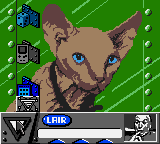
When the game boots up, you will see a computer desktop styled after a parody of Windows. A cursor appears on screen, controlled by the D-Pad. Move the cursor over icons and press the A button (X key) to click on them. Each icon opens a different screen - some are static jokes, others are simple interactive mini-games.
The core loop is purely exploratory. Click every icon you see to discover what happens. There is no health bar, no timer, and no fail state in the traditional sense - just a series of gags and light interactions. Some screens let you interact with objects using the same click mechanic. To exit a screen, look for a close button (often a red X in the corner) or press the B button (S key) to back out.
Since the game mimics a computer interface, expect to see pop-up windows, file folders, and absurd error messages. The humor is directly lifted from the Austin Powers movies. If you get stuck, just keep clicking - there is no wrong path. The whole thing is designed to be a short, silly experience.
CONTROLS
Controls
- Arrow Keys: D-Pad / Movement
- X: A button (jump / confirm)
- S: B button (run / attack / cancel)
- Enter: Start / Pause
- V: Select
Austin Powers - Welcome to my Underground Lair! FAQ
Which regions was Austin Powers - Welcome to my Underground Lair! released in?
The game was released exclusively in the USA. There is no documented Japanese or European release, and it remains a North American exclusive for the Game Boy Color.
Is Austin Powers - Welcome to my Underground Lair! exclusive to Game Boy Color or did it appear on other systems?
This title is exclusive to the Game Boy Color. While other Austin Powers games appeared on consoles like the PlayStation and Nintendo 64, the desktop parody concept only came to Nintendo's 8-bit handheld.
In what year was Austin Powers - Welcome to my Underground Lair! originally released?
The exact release year is not widely documented, but it likely came out around 1999 or 2000, coinciding with the franchise's peak popularity. Reliable sources do not list a precise date.
You may also like
All Game Boy Color games











GAME INFO
- Platform
- Game Boy Color
- Genre
- Simulation
- Players
- 1
- Region
- USA
COMMENTS (0)
No comments yet. Be the first to share your thoughts.