The game loads when you press Play · press “Play Now” inside the game if it asks.
10-Pin Bowling (USA)
10-Pin Bowling
Getting to Know 10-Pin Bowling
- Game Boy Color
- Sports
- 5· 0 votes
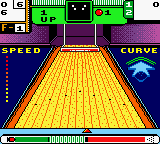
The core gameplay revolves around lining up your shot, selecting power and spin, then watching the ball roll down the lane to knock down pins. You control the bowler's position left or right, set the angle, and time the release for accuracy. Matches likely follow standard bowling rules with frames and scoring, though specific modes or multiplayer options are not confirmed in available documentation. The game focuses on the fundamental mechanics of bowling without extra frills or story elements.
For retro gaming fans, 10-Pin Bowling occupies a humble niche as a no-nonsense sports sim from an era when Game Boy Color libraries were filled with such titles. It may not stand alongside bigger-name releases, but its straightforwardness and portability make it a functional example of how bowling translated to the small screen. If you enjoy classic arcade sports games or want a quick distraction that doesn't demand much commitment, this one is worth a roll.
GAME INFO
- Platform
- Game Boy Color
- Genre
- Sports
- Region
- USA
How to play 10-Pin Bowling online
Getting Started
Start by selecting a mode from the title screen using the D-pad and confirming with X. In a standard game, you take turns bowling frames like real ten-pin bowling. Use the D-pad left or right to position your bowler on the lane. Then press and hold the A button (X on keyboard) to start the power gauge - release it at your desired strength. Next, a spin or direction indicator appears; use the D-pad to add curve to the ball and press A again to release. Time your release well to hit the pocket between the front pin and the one behind it for a strike.
The goal is to knock down all ten pins in as few rolls as possible. Each frame gives you two rolls unless you get a strike. Spares and strikes earn bonus points carried into subsequent frames. The game keeps score automatically, so focus on consistency. If you are unfamiliar with bowling scoring, the game follows standard rules - 10 frames, with the tenth frame offering extra rolls if you strike or spare.
Keep an eye on the lane conditions - some games simulate oil patterns affecting ball movement, though details on 10-Pin Bowling's implementation are not documented. Experiment with different starting positions and spin amounts to find what works. Practice makes perfect, and this is a solid game to hone your virtual bowling skills on the go.
CONTROLS
Controls
- Arrow Keys: D-Pad / Movement
- X: A button (jump / confirm)
- S: B button (run / attack / cancel)
- Enter: Start / Pause
- V: Select
10-Pin Bowling FAQ
What makes 10-Pin Bowling stand out among Game Boy Color titles of its era?
Its straightforward focus on core bowling mechanics without added complexity or gimmicks sets it apart. Many GBC sports games tried to cram in multiple modes or mini-games, but this one keeps things simple and true to the alley experience.
Is 10-Pin Bowling exclusive to Game Boy Color or did it appear on other systems?
The available information suggests it was released only for the Game Boy Color. No ports or versions on other platforms are widely documented in retro gaming databases.
Is 10-Pin Bowling considered easy to pick up or challenging?
It is designed for quick, accessible play typical of handheld sports titles. The controls are intuitive, but mastering timing and spin for consistent strikes takes practice, offering a mild challenge for those aiming for high scores.
You may also like
All Game Boy Color games











GAME INFO
- Platform
- Game Boy Color
- Genre
- Sports
- Region
- USA
COMMENTS (0)
No comments yet. Be the first to share your thoughts.