The game loads when you press Play · press “Play Now” inside the game if it asks.
Super Lode Runner (Japan)
Super Lode Runner
Super Lode Runner: FDS Puzzle
- Famicom Disk System
- Puzzle
- 5· 0 votes
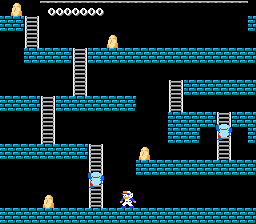
Super Lode Runner is a Famicom Disk System port of the classic Lode Runner puzzle-platformer, released exclusively in Japan. This version was published by Irem in 1987, bringing the gold-collecting, hole-digging action to Nintendo's disk-based system. It's essentially the same core game that made the series famous, but adapted for the FDS with its own level set and a few tweaks to fit the hardware.
You control a stick figure running through a grid of brick platforms, collecting all the gold bars in each level while avoiding patrolling enemies. The twist is that you can dig holes in the floor to trap foes temporarily, then run across them or escape. Each stage is a self-contained puzzle requiring careful timing and route planning. The FDS version sticks to the original formula: no power-ups, just pure level memorization and quick reflexes.
For modern players, Super Lode Runner holds up as a tight, challenging puzzle game that rewards patience and pattern recognition. While it's not a revolutionary port, it represents a solid slice of late-80s FDS software. If you enjoy games like Lode Runner or Dig Dug, this Japanese exclusive is worth tracking down through emulation for its authentic old-school difficulty.
Characters remain nameless and storyless - it's all about the gameplay. The FDS version also benefits from the system's disk-based saving, though it's a small convenience in a game built around short, repeatable levels.
GAME INFO
- Platform
- Famicom Disk System
- Genre
- Puzzle
- Publisher
- Broderbund
- Developer
- Douglas E. Smith
- Released
- 1987
- Players
- 1
- Region
- Japan
- Based on
- Lode Runner
More Lode Runner Games
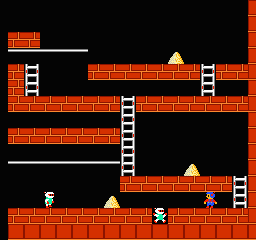
Ready for another round? Explore more Lode Runner games and console editions. Choose a game below to play it on its own page.


How to play Super Lode Runner online
Getting Started: When you first boot up Super Lode Runner, you'll see a title screen in Japanese. Press Start to reach the main menu, where you can choose to start a new game or continue a saved one. Since the menus are entirely in Japanese, the most straightforward option is to press Start again to begin, as the new game command is usually the first entry. Once in a level, your goal is to collect all the gold bars scattered across the screen.
The core loop is simple: guide your character through the maze-like platforms, avoid the red enemies that patrol each stage, and use the B button (S key) to dig holes in the brick blocks directly to your left or right. If an enemy falls into a hole, it will be trapped for a few seconds, allowing you to walk over it. After a moment, the enemy resurfaces, so timing is critical. Each level ends when all gold is collected, and you move to the next, harder stage. If you touch an enemy while not in a hole, you lose a life and restart the level from scratch.
A key tip: enemies move faster than you, so you'll need to plan escape routes. You can also create cascading holes by digging beneath enemies that are walking above you. The FDS version includes a level editor accessed from the main menu, but it's entirely in Japanese. Experiment with the Select button (V) to find it. Saving is handled via the disk system - your progress is written to the disk image when you select the save option in the pause menu (press Start during gameplay).
CONTROLS
Controls
- Arrow Keys: D-Pad / Movement
- X: A button (jump / confirm)
- S: B button (run / attack / cancel)
- Enter: Start / Pause
- V: Select
Super Lode Runner FAQ
Who developed Super Lode Runner?
Super Lode Runner was developed by Irem, a Japanese company known for arcade and console games. They handled this Famicom Disk System port of the original Broderbund title.
In what year was Super Lode Runner originally released?
Super Lode Runner was released in 1987 for the Famicom Disk System in Japan. This date is widely cited for the FDS version.
Can players save progress in Super Lode Runner?
Yes, the Famicom Disk System version supports saving directly to the disk. Players can save their progress by selecting the save option from the pause menu, which writes the data to the disk image.
You may also like
All Famicom Disk System games Aki to Tsukasa no Fushigi no Kabe
 Yume Koujou - Doki Doki Panic
 Bishoujo Hanafuda Club Vol.2 - Koikoi Bakappana Hen
 Bishoujo Shashinkan - Studio Cut
 Bishoujo Sexy Slot
 Bishoujo Hanafuda Club Vol.1 - Oichokabu Hen
 Transformers - The Headmasters
 Bakutoushi Patton-kun
 Aliens - Alien 2
 Tenshitachi no Houkago
 Backgammon
 Chitei Tairiku Ordola
GAME INFO
- Platform
- Famicom Disk System
- Genre
- Puzzle
- Publisher
- Broderbund
- Developer
- Douglas E. Smith
- Released
- 1987
- Players
- 1
- Region
- Japan
- Based on
- Lode Runner
COMMENTS (0)
No comments yet. Be the first to share your thoughts.