CHOOSE A VERSION
2 versions · same consoleChoose an original release, regional version, revision, bootleg or clearly labelled ROM hack/mod, then press Play. Hacks may change the gameplay. Switching versions restarts the player.
Selected: Default · USA · USA
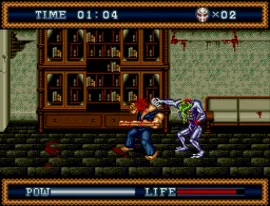
The game loads when you press Play · press “Play Now” inside the game if it asks.
Splatterhouse 3 (USA)
Splatterhouse 3
Splatterhouse 3: Genesis Beat em Up
- SEGA Genesis
- Beat em Up
- 5· 0 votes
GAME INFO
- Platform
- SEGA Genesis
- Genre
- Beat em Up
- Publisher
- Namco
- Developer
- Now Production
- Released
- 1993
- Players
- 1
- Region
- USA
More Splatterhouse Games
Ready for another round? Explore more Splatterhouse games and console editions. Choose a game below to play it on its own page.
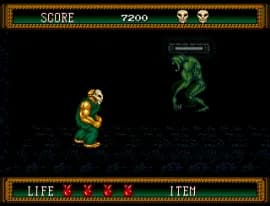

How to play Splatterhouse 3 online
CONTROLS
Controls
- Arrow Keys: D-Pad / Movement
- X: A button
- S: B button
- Z: C button
- A: X button (6-button pad)
- Q: Y button (6-button pad)
- E: Z button (6-button pad)
- Enter: Start / Mode
Splatterhouse 3 FAQ
What makes Splatterhouse 3 stand out among SEGA Genesis titles of its era?
Its combination of horror movie aesthetics with arcade-style beat 'em up gameplay was unusual for the 16-bit era. The game features detailed sprite work and gory enemy designs that were controversial but also memorable.
Is Splatterhouse 3 an official release, a fan hack, a prototype, or another kind of build?
It is an official commercial release by Namco for the SEGA Genesis. The USA version contains English text and was distributed in North America.
Can players save progress in Splatterhouse 3?
The game does not have a battery-backed save feature. Players must rely on the level password system to continue progress. Passwords are given after completing certain stages.
You may also like
All SEGA Genesis games











GAME INFO
- Platform
- SEGA Genesis
- Genre
- Beat em Up
- Publisher
- Namco
- Developer
- Now Production
- Released
- 1993
- Players
- 1
- Region
- USA
COMMENTS (0)
No comments yet. Be the first to share your thoughts.