The game loads when you press Play · press “Play Now” inside the game if it asks.
R.B.I. Baseball 3 (USA)
R.B.I. Baseball 3
What is R.B.I. Baseball 3?
- SEGA Genesis
- Sports
- 5· 0 votes
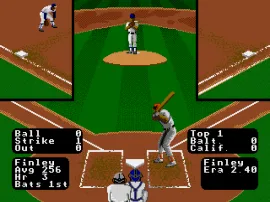
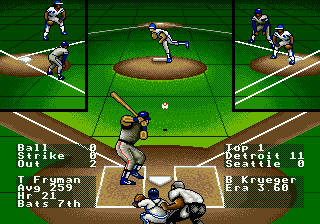
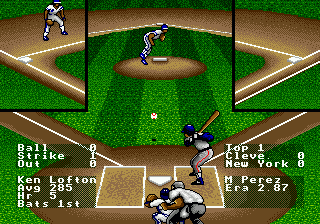
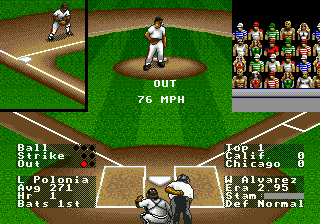
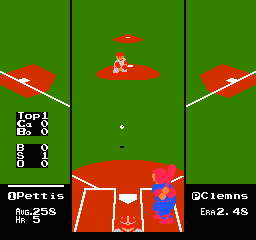
At its core, R.B.I. Baseball 3 is a straightforward baseball game. You pick a team from the available MLB-licensed clubs and compete in a nine-inning game. The action is viewed from a traditional behind-the-pitcher perspective when batting and a behind-the-catcher view when pitching. Pitching involves selecting a pitch type and aiming with the D-pad, while batting requires timing your swing to meet the ball. Fielding and base running are handled with simple button presses, letting you throw to bases or control runners. The game keeps things fast and responsive, with no deep stat management or franchise modes - it's all about playing a single game or a short season.
For modern retro gamers, R.B.I. Baseball 3 holds up as a quick, pick-up-and-play sports title. It doesn't have the depth of later baseball sims like Ken Griffey Jr. Presents Major League Baseball, but its responsive controls and colorful visuals make it a nice pallet cleanser between heavier games. The Tengen branding gives it a bit of nostalgia for those who remember their quirky catalog. If you're looking for a no-frills baseball experience that gets you into the action fast, this one is worth a few innings.
GAME INFO
- Platform
- SEGA Genesis
- Genre
- Sports
- Released
- 1991
- Players
- 1-2
- Region
- USA
More R.B.I. Baseball Games
Ready for another round? Explore more R.B.I. Baseball games and console editions. Choose a game below to play it on its own page.
How to play R.B.I. Baseball 3 online
Getting Started
When you boot up R.B.I. Baseball 3, you'll see a title screen and then a menu. Use the D-pad to navigate and press Enter (Start) to confirm your choice. You can select one of the available MLB teams, and then either play a single exhibition game or a short season. The game defaults to a human vs. computer matchup, but you can also play two-player head-to-head by having a second player press Start on their controller.
The core loop is simple: pitch, bat, field, run. As pitcher, you select a pitch type and aim with the D-pad, then press the A button to throw. As batter, wait for a pitch in the strike zone and press the appropriate button to swing. If you make contact, the ball goes into play and you must field it or run to bases. Fielding is mostly automatic - your players move toward the ball, but you control which base to throw to using the D-pad plus the A button. Base running is handled by pressing buttons while a runner is selected - you can advance or retreat.
A few tips: pay attention to the pitcher's stamina indicator; throwing too many off-speed pitches can lead to fatigue. On offense, try to be patient at the plate and wait for pitches in your comfortable zone. The computer AI is decent but exploitable, so mix up your pitch locations. If you're playing against a friend, the fast-paced nature of the game really shines. There are no complex menus or stat tracking, so you can jump right into the action.
CONTROLS
Controls
- Arrow Keys: D-Pad / Movement
- X: A button
- S: B button
- Z: C button
- A: X button (6-button pad)
- Q: Y button (6-button pad)
- E: Z button (6-button pad)
- Enter: Start / Mode
R.B.I. Baseball 3 FAQ
Is R.B.I. Baseball 3 considered easy to pick up or challenging?
The game leans toward the accessible side of the baseball simulation spectrum. Controls are responsive and few in number, making it easy to grasp the basics within a few minutes. That said, the computer opponent offers a fair challenge, and mastering pitch timing and batting accuracy takes some practice.
Is R.B.I. Baseball 3 exclusive to SEGA Genesis or did it appear on other systems?
R.B.I. Baseball 3 was released on both the SEGA Genesis and the Nintendo Entertainment System in 1991. Each version has its own look and feel, but the core gameplay is identical across platforms. The Genesis version benefits from smoother graphics and faster load times due to the hardware.
What makes R.B.I. Baseball 3 stand out among SEGA Genesis titles of its era?
Its place as the third entry in Tengen's R.B.I. series gives it a certain charm, especially for collectors interested in Tengen's history as an unlicensed publisher. The game also balances arcade-like speed with enough baseball mechanics to feel authentic. It doesn't try to out-simulate more complex titles, but that simplicity is part of its lasting appeal.
You may also like
All SEGA Genesis games











GAME INFO
- Platform
- SEGA Genesis
- Genre
- Sports
- Released
- 1991
- Players
- 1-2
- Region
- USA
COMMENTS (0)
No comments yet. Be the first to share your thoughts.