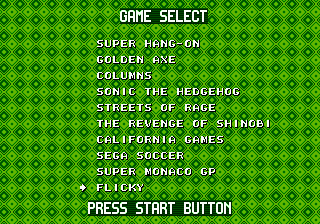
The game loads when you press Play · press “Play Now” inside the game if it asks.
Mega Games 10 (Brazil)
Mega Games 10
Mega Games 10: Genesis Action
- SEGA Genesis
- Action
- Compilation
- 5· 0 votes
GAME INFO
- Platform
- SEGA Genesis
- Genre
- Action
More Mega Games Games
Ready for another round? Explore more Mega Games games and console editions. Choose a game below to play it on its own page.
How to play Mega Games 10 online
Getting Started
When you load Mega Games 10, the first thing you'll see is a menu screen listing the ten games available on the cartridge. Use the D-Pad (Arrow Keys) to highlight a title and press Enter (Start) to launch it. The menu may also include a short description or a preview graphic for each game, depending on the build.
Because this is a compilation, there is no single core loop. After selecting a game, you play through it just like the original standalone title. Controls vary per game - some use A to jump, others use B to attack. If you're unsure, press the A and B buttons experimentally to see what they do. When you finish or want to switch games, you may need to press Start or Select to return to the menu, though some compilations require a console reset.
If the compilation includes multiple controllers, you can play local multiplayer games by plugging in more than one player and pressing Start on the menu screen. Otherwise, it's a single-player experience. There are no save functions - you'll have to finish each game in one sitting or rely on passwords if any of the included games support them.
CONTROLS
Controls
- Arrow Keys: D-Pad / Movement
- X: A button
- S: B button
- Z: C button
- A: X button (6-button pad)
- Q: Y button (6-button pad)
- E: Z button (6-button pad)
- Enter: Start / Mode
Mega Games 10 FAQ
Is Mega Games 10 exclusive to SEGA Genesis or did it appear on other systems?
Mega Games 10 was released only for the SEGA Genesis. No ports or versions on other platforms have been documented.
In what year was Mega Games 10 originally released?
The exact release year is not widely documented in English-language sources. It likely appeared in the mid-1990s, but specific records are scarce.
Who developed Mega Games 10?
The developer of this compilation is not widely documented. It was probably assembled by a Brazilian distributor or publisher, not by Sega itself.
You may also like
All SEGA Genesis games











GAME INFO
- Platform
- SEGA Genesis
- Genre
- Action
COMMENTS (0)
No comments yet. Be the first to share your thoughts.