CHOOSE A VERSION
2 versions · same consoleChoose an original release, regional version, revision, bootleg or clearly labelled ROM hack/mod, then press Play. Hacks may change the gameplay. Switching versions restarts the player.
Selected: Default · USA · USA
The game loads when you press Play · press “Play Now” inside the game if it asks.
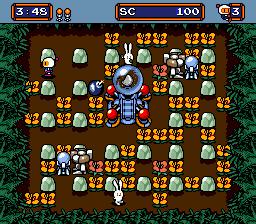
Mega Bomberman (USA)
Mega Bomberman
Mega Bomberman Overview
- SEGA Genesis
- Action
- 5· 0 votes
GAME INFO
- Platform
- SEGA Genesis
- Genre
- Action
- Released
- 1994
- Players
- 1-2
- Region
- USA
- Based on
- Bomberman '94
More Bomberman '94 Games
Ready for another round? Explore more Bomberman '94 games and console editions. Choose a game below to play it on its own page.

How to play Mega Bomberman online
CONTROLS
Controls
- Arrow Keys: D-Pad / Movement
- X: A button
- S: B button
- Z: C button
- A: X button (6-button pad)
- Q: Y button (6-button pad)
- E: Z button (6-button pad)
- Enter: Start / Mode
Mega Bomberman FAQ
What type of game is Mega Bomberman?
It is an action-maze game where players place bombs to destroy obstacles and defeat enemies. Part of the Bomberman series, this version is a port of Bomberman '94 from the TurboGrafx-16.
Is Mega Bomberman exclusive to SEGA Genesis or did it appear on other systems?
No, it is not exclusive. Mega Bomberman is a port of Bomberman '94, which originally released on the TurboGrafx-16 (PC Engine) in Japan. The Genesis release in North America is simply a localized version with the new title.
Does Mega Bomberman have a multiplayer or co-op mode?
Yes, it features a two-player battle mode. This mode pits players against each other in an arena, with the goal of eliminating the opponent using bombs and power-ups. There is no co-op campaign, only competitive multiplayer.
You may also like
All SEGA Genesis games











GAME INFO
- Platform
- SEGA Genesis
- Genre
- Action
- Released
- 1994
- Players
- 1-2
- Region
- USA
- Based on
- Bomberman '94
COMMENTS (0)
No comments yet. Be the first to share your thoughts.