CHOOSE A VERSION
2 versions · same consoleChoose an original release, regional version, revision, bootleg or clearly labelled ROM hack/mod, then press Play. Hacks may change the gameplay. Switching versions restarts the player.
Selected: Default · Japan · v1.0 · Japan
The game loads when you press Play · press “Play Now” inside the game if it asks.
J. League Pro Striker (Japan) (v1.0)
J. League Pro Striker
Inside J. League Pro Striker
- SEGA Genesis
- Sports
- 5· 0 votes
GAME INFO
- Platform
- SEGA Genesis
- Genre
- Sports
- Region
- Japan
- Version
- v1.0
More J. League Pro Striker Games
Ready for another round? Explore more J. League Pro Striker games and console editions. Choose a game below to play it on its own page.
How to play J. League Pro Striker online
Getting Started
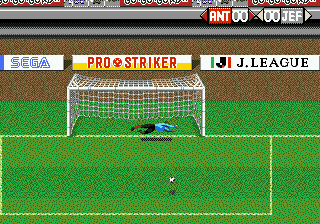
When you first boot the game, you'll see a title screen in Japanese. Press Start to move to the main menu. The options are typically arranged as a vertical list: you'll use the D-Pad to highlight your choice and press X (A button) to confirm. If you see a submenu, you might need to press V (Select) for additional settings. Since the text is all in Japanese, you may need to experiment with the order of options to start a match. Generally, the first option is "Exhibition Match," the second is "Tournament," and further down might be options for team edit or settings.
Once you select a mode, you'll likely pick your team. The team selection screen shows a list of J. League clubs. Use the D-Pad to scroll and press X to pick. After choosing sides, you may be asked to set formations or difficulty. The match itself is straightforward: you control a player near the ball. Use the D-Pad to move, X to jump/header, S to kick or tackle, and Z or A for special actions if available. The core loop is passing the ball around the field, advancing toward the opponent's goal, and shooting when you see an opening. Defend by chasing the ball carrier and pressing S to tackle.
Pay attention to the power bar when shooting or passing; holding the button longer usually sends the ball harder or farther. If you score a goal, the game continues until time runs out. The match ends after 90 minutes (in-game time), and either a winner is declared or it goes to penalty kicks. To quit a match, press Enter to pause and then select the quit option. Remember that this is a Japanese title, so if you get stuck navigating menus, try pressing different buttons or looking for a visual cue like a cursor. With a little patience, you can enjoy a solid soccer sim that plays like many other Genesis sports titles.
CONTROLS
Controls
- Arrow Keys: D-Pad / Movement
- X: A button
- S: B button
- Z: C button
- A: X button (6-button pad)
- Q: Y button (6-button pad)
- E: Z button (6-button pad)
- Enter: Start / Mode
J. League Pro Striker FAQ
Is J. League Pro Striker considered easy to pick up or challenging?
It sits in the middle ground. The basic controls are simple: pass, shoot, tackle. But the AI can be punishing on higher difficulty levels. New players might struggle with positioning and power timing at first, but a few matches are enough to get the hang of it.
What makes J. League Pro Striker stand out among SEGA Genesis titles of its era?
Its official J. League license gives it authentic team names and kits from 1990s Japanese soccer. Most other Genesis soccer games used generic teams or international leagues, so this regional focus makes it unique for fans of the J. League.
What type of game is J. League Pro Striker?
It is a sports game, specifically a soccer simulation. You control a team through full matches with realistic rules, formations, and a top-down perspective. It belongs to the same category as games like Sega's own Mega/Sonic Soccer or EA's FIFA series on the Genesis.
You may also like
All SEGA Genesis games


GAME INFO
- Platform
- SEGA Genesis
- Genre
- Sports
- Region
- Japan
- Version
- v1.0
COMMENTS (0)
No comments yet. Be the first to share your thoughts.