CHOOSE A VERSION
2 versions · same consoleChoose an original release, regional version, revision, bootleg or clearly labelled ROM hack/mod, then press Play. Hacks may change the gameplay. Switching versions restarts the player.
Selected: Default · USA · USA
The game loads when you press Play · press “Play Now” inside the game if it asks.
Alien Crush (USA)
Alien Crush
Alien Crush on TG16
- NEC TURBOGRAFX-16
- Arcade
- 5· 0 votes
GAME INFO
- Platform
- NEC TURBOGRAFX-16
- Genre
- Arcade
- Publisher
- NEC Technologies
- Developer
- Compile
- Released
- 1989
- Players
- 1
- Region
- USA
How to play Alien Crush online
Getting Started
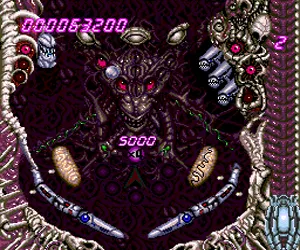
When you start Alien Crush, you see a pinball table with a sci-fi alien theme. The goal is classic pinball: keep the ball in play and score points by hitting bumpers, targets, and ramps. Use the left and right arrow keys to control the flippers (mapped to the D-pad). Press the A button (X key) to launch the ball and to nudge the table if needed, though nudging is risky and can tilt the machine.
The table has multiple levels and special areas that open up as you hit certain targets. Look for glowing lanes and bumpers that trigger bonus multipliers or open up the "Alien" feature. The game keeps track of your score and high scores, but there is no save feature; each session starts fresh. Focus on hitting the ramps to increase your multiplier and aim for the bumpers that light up to maximize points.
There are two flippers controlled by the D-pad left and right. The ball launches automatically after a drain, but you need to press the A button to launch initially. Mastering the timing of flipper hits and learning where the ball reacts will help you string together long rallies. The table is compact but layered, so spend a few plays just exploring how the ball moves across the different bumpers and switches.
CONTROLS
Controls
- Arrow Keys: D-Pad / Movement
- X: I button
- S: II button
- Enter: Run / Start
- V: Select
Alien Crush FAQ
Is Alien Crush considered easy to pick up or challenging?
The game is straightforward to start, but chaining high scores requires practice. The table layout has multiple tiers and bumpers that can send the ball into unpredictable patterns, making it harder than a simple flat table. Newcomers will enjoy the immediate feedback, while experienced pinball players will find depth in scoring strategies.
Can players save progress in Alien Crush?
No, Alien Crush does not include a save or password feature. Each game is a single session that resets when the machine tilts or all balls are lost. High scores are stored temporarily during the session but are lost on power-off.
Is Alien Crush exclusive to NEC TURBOGRAFX-16 or did it appear on other systems?
Alien Crush originally released on the TurboGrafx-16 and also appeared on the Nintendo Wii Virtual Console in 2007 for the North American and European regions. It was not ported to other contemporary consoles during its initial release era.
You may also like
All NEC TURBOGRAFX-16 games











GAME INFO
- Platform
- NEC TURBOGRAFX-16
- Genre
- Arcade
- Publisher
- NEC Technologies
- Developer
- Compile
- Released
- 1989
- Players
- 1
- Region
- USA
COMMENTS (0)
No comments yet. Be the first to share your thoughts.