CHOOSE A VERSION
2 versions · same consoleChoose an original release, regional version, revision, bootleg or clearly labelled ROM hack/mod, then press Play. Hacks may change the gameplay. Switching versions restarts the player.
Selected: Default · USA · USA
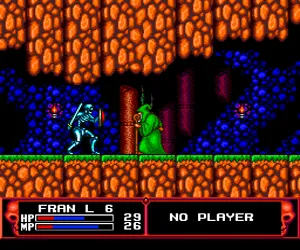
The game loads when you press Play · press “Play Now” inside the game if it asks.
Cadash (USA)
Cadash
Inside Cadash
- NEC TURBOGRAFX-16
- RPG
- 5· 0 votes
You pick one of four character classes - Fighter, Mage, Priest, or Ninja - each with unique stats and abilities. From there, you explore side-scrolling levels, hack and slash through fantasy monsters, collect gold and items, and level up your character. The core loop involves fighting enemies, managing your health and magic, and gearing up with better equipment found or bought in towns. It's straightforward action with an RPG backbone: gain experience, raise stats, and tackle tougher areas.
Cadash stands out on the TurboGrafx-16 for offering a genuine action RPG experience at a time when the system had few such titles. It's not deep or revolutionary, but the variety of character classes gives it replay value, and the arcade-style pacing keeps things moving. If you enjoy old-school action games with light RPG elements, this one is worth a spin - just don't expect a sprawling story or complex systems.
GAME INFO
- Platform
- NEC TURBOGRAFX-16
- Genre
- RPG
- Publisher
- Taito
- Developer
- Taito
- Released
- 1990
- Players
- 1
- Region
- USA
How to play Cadash online
Getting Started
When you fire up Cadash, the first screen asks you to pick a character class. Each one plays differently: the Fighter is a balanced melee brawler, the Mage uses ranged spells, the Priest heals and uses holy magic, and the Ninja is quick with daggers. Choose based on your preferred style - you can't change mid-game, so pick wisely.
Once you start, you'll appear in a town or the first level. Move with the D-Pad (Arrow Keys) and attack with S (B button). Jump with X (A button). Your goal is to fight through side-scrolling stages, battling skeletons, slimes, and other fantasy foes. Defeated enemies drop gold and sometimes items. Collect gold to buy weapons, armor, and potions in town shops. As you defeat enemies, you gain experience and level up, increasing your stats like strength and hit points.
Keep an eye on your health bar and magic meter (shown on the HUD). You can refill health by using potions or visiting inns. Magic spells require the Mage or Priest class and are used with the Y button (Z key). The game is not particularly forgiving - enemies hit hard, so learn their patterns and don't rush into groups. Save often if the emulator supports save states, because Cadash has no built-in saves or passwords on the TurboGrafx-16 version.
CONTROLS
Controls
- Arrow Keys: D-Pad / Movement
- X: I button
- S: II button
- Enter: Run / Start
- V: Select
Cadash FAQ
Who developed Cadash?
Taito developed the original arcade version and handled the TurboGrafx-16 port as well. They were known for classic arcade titles and brought their action-RPG design to home consoles.
Is there anything iconic or memorable about Cadash?
Cadash is remembered for blending side-scrolling action with RPG character progression, offering four distinct classes that change how you play. Its fantasy setting and challenging gameplay made it a standout early entry in the action RPG genre on home consoles.
What type of game is Cadash?
It is a side-scrolling Action/RPG fantasy game. Players explore levels, fight monsters in real time, gain experience, and improve their character through equipment and leveling.
You may also like
All NEC TURBOGRAFX-16 games










GAME INFO
- Platform
- NEC TURBOGRAFX-16
- Genre
- RPG
- Publisher
- Taito
- Developer
- Taito
- Released
- 1990
- Players
- 1
- Region
- USA
COMMENTS (0)
No comments yet. Be the first to share your thoughts.