CHOOSE A VERSION
2 versions · same consoleChoose an original release, regional version, revision, bootleg or clearly labelled ROM hack/mod, then press Play. Hacks may change the gameplay. Switching versions restarts the player.
Selected: Default · USA · USA
The game loads when you press Play · press “Play Now” inside the game if it asks.
S.C.A.R.S. (USA)
S.C.A.R.S.
S.C.A.R.S. on N64
- Nintendo 64
- Racing
- 5· 0 votes
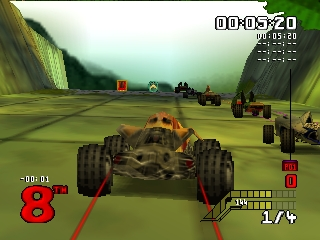
S.C.A.R.S. (USA) is a racing game released for the Nintendo 64, developed by the studio known for its work in the late 90s. It blends traditional racing mechanics with a unique twist, allowing players to engage in combat while racing. This title falls under the action racing genre, which was quite popular in that era, especially on the Nintendo 64 platform.
In S.C.A.R.S., players choose from a variety of vehicles and compete in races across different tracks. The gameplay combines speed with strategic use of weapons and power-ups to hinder opponents. Players must navigate courses, avoid obstacles, and utilize items to gain an edge over their rivals. The mechanics are typical of the genre, offering a mix of racing and combat elements that create an engaging experience.
Today, S.C.A.R.S. is worth trying for those who appreciate retro racing games with a combat twist. While it may not reach the iconic status of titles like Mario Kart 64, it offers a fun diversion with its unique approach. Fans of the genre will appreciate its blend of speed and strategy, making it an interesting addition to any retro gaming collection.
GAME INFO
- Platform
- Nintendo 64
- Genre
- Racing
- Publisher
- Ubisoft
- Developer
- Vivid Image
- Released
- 1998
- Players
- 1-2
- Region
- USA
How to play S.C.A.R.S. online
Getting started in S.C.A.R.S. involves selecting your vehicle and choosing a race track. Once the race begins, you will navigate through the course while using various power-ups and weapons to gain advantages over your opponents. The core loop consists of racing, utilizing combat mechanics, and trying to finish in the best position possible.
As you play, familiarize yourself with the different power-ups available on the track, as they can significantly impact your performance. Keep an eye out for shortcuts and potential hazards on the course. Mastering the controls and understanding the mechanics will help you come out on top in this fast-paced racing experience.
CONTROLS
Controls
- Arrow Keys — D-Pad / Movement
- X — A button
- S — B button
- Z — Z trigger
- A — C-Down
- Q — L shoulder
- E — R shoulder
- Enter — Start
S.C.A.R.S. FAQ
Who developed S.C.A.R.S.?
The developer of S.C.A.R.S. is not widely documented, but it is known to be a title from the late 90s gaming era.
What type of game is S.C.A.R.S.?
This game is an action racing title that combines traditional racing with combat elements, allowing players to use weapons during races.
Does S.C.A.R.S. have a multiplayer or co-op mode?
S.C.A.R.S. features a multiplayer mode, enabling players to compete against each other in races, which adds to the game's replayability.
You may also like
All Nintendo 64 games











GAME INFO
- Platform
- Nintendo 64
- Genre
- Racing
- Publisher
- Ubisoft
- Developer
- Vivid Image
- Released
- 1998
- Players
- 1-2
- Region
- USA
COMMENTS (0)
No comments yet. Be the first to share your thoughts.