The game loads when you press Play · press “Play Now” inside the game if it asks.
Outrun
Outrun
Getting to Know Outrun
GAME INFO
More Outrun Games
Ready for another round? Explore more Outrun games and console editions. Choose a game below to play it on its own page.
How to play Outrun online
Getting Started
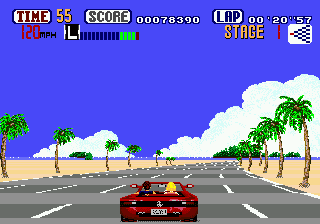
On starting Out Run you see a title screen and then a menu for selecting your music track. Pick from the three tunes using the confirm button. Next you choose a starting destination from a map - each leads to a different route with varying difficulty and scenery. The game begins as soon as you press Start.
Your main job is to steer your car left and right with the Arrow Keys to avoid oncoming traffic. You must reach each checkpoint before the timer reaches zero. Hitting other cars causes a brief spin and time loss. At fork points, the road splits and you choose a direction by moving left or right.
There is no save. If you fail to reach the destination in time, it is game over. The goal is to finish the route with the best time. Practice the tracks to memorize traffic patterns and pick the fastest path.
CONTROLS
Controls
- Arrow Keys: D-Pad / Movement
- X: Trigger 1
- S: Trigger 2
- Enter: Start
Outrun FAQ
What type of game is Outrun?
Out Run is a racing game where you drive a sports car through scenic routes while avoiding civilian traffic. It is an arcade-style racer focused on speed, branching paths, and a time limit.
Is Outrun exclusive to MSX 2 or did it appear on other systems?
Out Run originally appeared in arcades in 1986 and was ported to many home systems including the MSX 2, Sega Master System, Commodore 64, and others. The MSX 2 version is one of several computer ports from that era.
Roughly how long does it take to finish Outrun?
A single race through one route can be completed in about 3 to 5 minutes if you drive well. To see all five endings and master all routes, you might spend a couple of hours in total.
COMMENTS (0)
No comments yet. Be the first to share your thoughts.