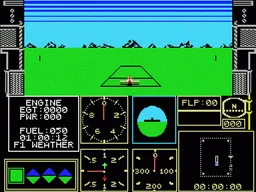
The game loads when you press Play · press “Play Now” inside the game if it asks.
Acrojet
Acrojet
Acrojet on MSX2
- MSX 2
- Simulation
- 5· 0 votes
GAME INFO
- Platform
- MSX 2
- Genre
- Simulation
- Publisher
- MicroProse
- Developer
- MicroProse
- Released
- 1985
- Players
- 1
- Region
- USA, Europe
How to play Acrojet online
Getting Started
When you first boot Acrojet on the MSX 2, you'll see a menu offering options like start, practice, or select your aircraft (there is only one plane, the Acrojet). Use the arrow keys to highlight your choice and press the A button (X on the keyboard) to confirm. The game expects you to read a brief instructions screen - pay attention to the required stunt sequence, typically listed as a series of abbreviations like LOOP, ROLL, or IMMELMANN.
Once in the air, your main task is to perform the listed stunts in order. Fly level first, then pitch up or down with the arrow keys, roll using left/right, and coordinate throttle (likely mapped to a shoulder button or number key) to maintain speed. If you stall, push the nose down and gain airspeed before trying again. The game logs your score as you complete each trick; a perfect run with no mistakes gets the highest points.
There is no combat or timer pressure - take your time to line up each maneuver. The MSX 2 version runs smoothly and the keyboard controls are responsive once you get used to the layout. For beginners, practice the simplest loop first, then work up to combined sequences. Keep an eye on the artificial horizon and altimeter to avoid entering a spin.
CONTROLS
Controls
- Arrow Keys: D-Pad / Movement
- X: Trigger 1
- S: Trigger 2
- Enter: Start
Acrojet FAQ
Which regions was Acrojet released in?
Acrojet was published by MicroProse primarily in the USA and Europe. The MSX 2 port likely saw distribution in European and Japanese markets where the MSX was popular, though exact regional lists are not fully documented.
Is Acrojet exclusive to MSX 2 or did it appear on other systems?
Acrojet first appeared on the Commodore 64 in 1985 and was later ported to the Amstrad CPC, ZX Spectrum, NEC PC-8801, NEC PC-9801, and MSX 2. It is not exclusive to any single platform.
What type of game is Acrojet?
Acrojet is a flight simulation game focused on aerial acrobatics. Unlike combat sims, its gameplay revolves around performing precise stunt sequences with a single propeller aircraft, emphasizing control and timing over shooting.
You may also like
All MSX 2 games











GAME INFO
- Platform
- MSX 2
- Genre
- Simulation
- Publisher
- MicroProse
- Developer
- MicroProse
- Released
- 1985
- Players
- 1
- Region
- USA, Europe
COMMENTS (0)
No comments yet. Be the first to share your thoughts.