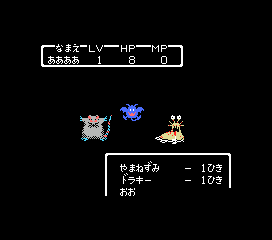
The game loads when you press Play · press “Play Now” inside the game if it asks.
Dragon Quest 2
Dragon Quest 2
Inside Dragon Quest 2
GAME INFO
More Dragon Quest Games
Ready for another round? Explore more Dragon Quest games and console editions. Choose a game below to play it on its own page.
 Dragon Quest 1
 Dragon Quest II - Akuryou no Kamigami
 Dragon Quest III - Soshite Densetsu he...
 Dragon Quest V - Hand of the Heavenly Bride
 Dragon Quest IV - Chapters of the Chosen
 Dragon Quest IX - Sentinels of the Starry Skies
 Dragon Quest VI - Realms of Revelation
 Dragon Quest III - Soshite Densetsu e...
 Dragon Quest III - Soshite Densetsu he...
 Dragon Quest V - Tenkuu no Hanayome
 Dragon Quest V - Tenkuu no Hanayome
 Dragon Quest V - Tenkuu no Hanayome
How to play Dragon Quest 2 online
Getting Started
When you start a new game, you'll be placed in the first town. Explore the area by talking to every NPC - some will give crucial hints about where to go next. Your first goal is to equip your hero with a weapon and armor from the item shop, then venture out onto the world map. Battles are random, so be ready to fight as you move.
The core loop involves traveling between towns and dungeons, fighting monsters for experience points and gold, and using that gold to buy better equipment. Leveling up increases your stats and unlocks new spells. Keep an eye on your HP and MP; return to town to rest at the inn when needed. Save your progress at the king's castle to avoid losing too much progress.
Since this is the Japanese version, all menus and dialogue are in Japanese. The main menu options are standard for the series: はなす (talk), どうぐ (item), つよさ (status), and ばしょ (spell). Use the confirm button to open chests and interact with objects. If you get stuck, try exploring every corner of the map - many secrets require backtracking with new items.
CONTROLS
Controls
- Arrow Keys: D-Pad / Movement
- X: Trigger 1
- S: Trigger 2
- Enter: Start
Dragon Quest 2 FAQ
Is Dragon Quest 2 an official release, a fan hack, a prototype, or another kind of build?
It is an official port of the Famicom classic to the MSX 1 computer, published by Enix in Japan. This is not a hack or fan creation; it's a legitimate commercial release from the time.
Is Dragon Quest 2 exclusive to MSX 1 or did it appear on other systems?
The game originally launched on the Famicom in 1987 and later received ports to the MSX, Super Famicom (as part of a compilation), and mobile platforms. The MSX version stands as one of the earliest home computer adaptations.
In what year was Dragon Quest 2 originally released?
The original Famicom version was released in 1987 in Japan. The MSX port followed in 1988, making it a fairly quick port to another popular Japanese computer system.












COMMENTS (0)
No comments yet. Be the first to share your thoughts.