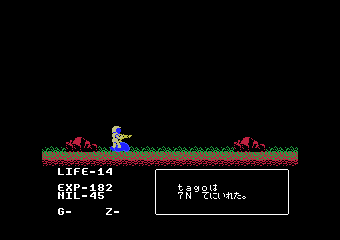
The game loads when you press Play · press “Play Now” inside the game if it asks.
A Life M36 Planet
A Life M36 Planet
What is A Life M36 Planet?
GAME INFO
How to play A Life M36 Planet online
Getting Started
Since detailed information about A Life M36 Planet is scarce, the first step is to load the game in an MSX1 emulator. Press Enter to start; if a title screen appears, try using the arrow keys and buttons to navigate. Because the game likely came from Japan, menus may be in Japanese, so be prepared to explore unfamiliar options.
The core gameplay is not documented, but based on the title, you may need to manage resources, explore the planet M36, or interact with its environment. Experiment with the controls to see what actions are possible. Remember that MSX1 games often rely on simple input mapping, so try pressing each button in different contexts.
For any hint on progress, look for visual clues on screen or try using the Select button to bring up an inventory or status menu. If you get stuck, many community forums have discussed obscure MSX titles, so searching for A Life M36 Planet online may uncover player-made guides or walkthroughs.
CONTROLS
Controls
- Arrow Keys: D-Pad / Movement
- X: Trigger 1
- S: Trigger 2
- Enter: Start
A Life M36 Planet FAQ
Who developed A Life M36 Planet?
The developer of A Life M36 Planet is not widely documented in standard retro gaming databases. It may have been created by a small Japanese studio that did not gain widespread recognition, but no official records confirm this.
Does A Life M36 Planet have a multiplayer or co-op mode?
No known documentation or reviews indicate that A Life M36 Planet includes multiplayer or co-op functionality. It was almost certainly designed as a single-player experience, consistent with the majority of MSX1 titles.
Is A Life M36 Planet exclusive to MSX 1 or did it appear on other systems?
A Life M36 Planet appears to be exclusive to the MSX1 platform. There are no known ports or versions for other computers or consoles, suggesting it was never released outside the MSX ecosystem.












COMMENTS (0)
No comments yet. Be the first to share your thoughts.