The game loads when you press Play · press “Play Now” inside the game if it asks.
3D Golf Simulation
3D Golf Simulation
3D Golf Simulation Overview
GAME INFO
How to play 3D Golf Simulation online
Getting Started
When you first load 3D Golf Simulation, you are likely greeted with a title screen and then a menu in Japanese. Navigate with the Arrow Keys and confirm with X (A button). Typically you will select a course, maybe a mode, and then begin a round. The core loop involves choosing a club, setting your aim, adjusting power, and executing a swing.
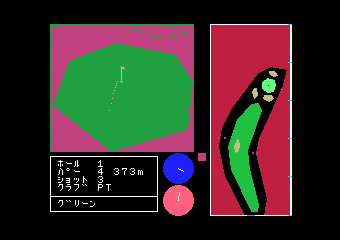
Swing mechanics on the MSX 1 often involve timing a power meter or pressing keys in sequence. The 3D view gives you a rough perspective of the fairway, hazards, and the flag. Wind and terrain might affect your shot, but specifics are not well recorded. Take your time with each shot and get a feel for how the game interprets your inputs.
Because menus are in Japanese, you may need to experiment with options or consult a translation guide. The goal is the same as any golf game: finish each hole in the fewest strokes. The game likely keeps score and may have a simple replay value for practicing.
CONTROLS
Controls
- Arrow Keys: D-Pad / Movement
- X: Trigger 1
- S: Trigger 2
- Enter: Start
3D Golf Simulation FAQ
Is 3D Golf Simulation considered easy to pick up or challenging?
The game offers a moderate learning curve common to early golf simulations. New players may need a few rounds to understand the swing timing and aim mechanics. Experienced players of the genre will find the challenge familiar.
What type of game is 3D Golf Simulation?
It is a sports simulation that puts you in control of a golfer playing a round of golf. The emphasis is on realistic (for its time) shot planning and execution rather than arcade action.
Is 3D Golf Simulation exclusive to MSX 1 or did it appear on other systems?
Based on available records, this title appears to be exclusive to the MSX 1 platform. No ports to other systems are known.












COMMENTS (0)
No comments yet. Be the first to share your thoughts.