
The game loads when you press Play · press “Play Now” inside the game if it asks.
Data-Navi Pro Yakyuu 2 (Japan)
Data-Navi Pro Yakyuu 2
What is Data-Navi Pro Yakyuu 2?
- Game Boy Color
- Sports
- 5· 0 votes
GAME INFO
- Platform
- Game Boy Color
- Genre
- Sports
- Players
- 1-2
- Region
- Japan
More Data-Navi Pro Yakyuu Games
Ready for another round? Explore more Data-Navi Pro Yakyuu games and console editions. Choose a game below to play it on its own page.
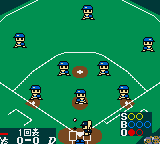
How to play Data-Navi Pro Yakyuu 2 online
CONTROLS
Controls
- Arrow Keys: D-Pad / Movement
- X: A button (jump / confirm)
- S: B button (run / attack / cancel)
- Enter: Start / Pause
- V: Select
Data-Navi Pro Yakyuu 2 FAQ
Who developed Data-Navi Pro Yakyuu 2?
The developer is not widely documented in English sources. It was likely produced by a Japanese studio under the Data-Navi brand, possibly related to Imagineer or Media Factory, but firm attribution is scarce.
Is Data-Navi Pro Yakyuu 2 considered easy to pick up or challenging?
As a baseball simulation, it has a moderate learning curve typical of sports games. Basic mechanics like batting and pitching are intuitive once you understand the controls, but navigating the Japanese menus adds a layer of difficulty for non-Japanese speakers.
Is Data-Navi Pro Yakyuu 2 exclusive to Game Boy Color or did it appear on other systems?
The game appears to be a Game Boy Color exclusive released only in Japan. No ports or versions for other platforms are known.
You may also like
All Game Boy Color games











GAME INFO
- Platform
- Game Boy Color
- Genre
- Sports
- Players
- 1-2
- Region
- Japan
COMMENTS (0)
No comments yet. Be the first to share your thoughts.