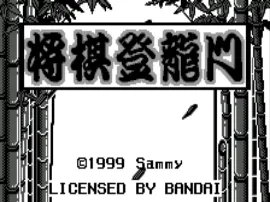
The game loads when you press Play · press “Play Now” inside the game if it asks.
Shogi Touryuumon (J) [M]
Shogi Touryuumon
Shogi Touryuumon - Board Game Classic
- WonderSwan
- Board Game
- 5· 0 votes
GAME INFO
- Platform
- WonderSwan
- Genre
- Board Game
- Players
- 1-2
- Region
- Japan
How to play Shogi Touryuumon online
Getting Started
When you launch Shogi Touryuumon, you will be greeted by a title screen and a menu in Japanese. Use the D-Pad to navigate and press X (A button) to confirm selections. Typically, you can choose between a single-player game against the computer or a two-player local match. The menu may also offer options for difficulty levels or game speed, though these are not always labelled in English.
Once a game starts, the shogi board appears. Your pieces are usually the bottom set (white/blank in WonderSwan's monochrome). Move a piece by first selecting it with the confirm button, then using the D-Pad to highlight a valid destination square and pressing confirm again. If you want to cancel a move, press S (B button). Captures happen automatically when you move onto an enemy piece. To drop a captured piece, select the piece from your inventory (often accessed via a side button like Z or Q) and place it on an empty square.
Since all text is in Japanese, it helps to know basic shogi notation or have a translation guide handy. The core objective is to checkmate the opponent's king. The AI provides a decent challenge for intermediate players, but there are no tutorials or hints - this is a straightforward simulation. If you get stuck, experiment with the buttons to discover menu functions, and remember that S often works as a back or cancel command.
CONTROLS
Controls
- Arrow Keys: D-Pad / Movement
- X: A button
- S: B button
- Enter: Start
- V: Sound
Shogi Touryuumon FAQ
Is Shogi Touryuumon an official release, a fan hack, a prototype, or another kind of build?
Based on available information, this appears to be an officially released commercial title for the WonderSwan in Japan. The ROM filename includes a [M] tag common in preservation databases, but no evidence points to it being a hack or prototype. Its presence on retrogames.cc alongside other retail WonderSwan games supports this.
Is there anything iconic or memorable about Shogi Touryuumon?
It stands out mainly as one of the few dedicated shogi simulations on the WonderSwan, occupying a niche for strategy board game fans. The game itself does not feature any notable characters, music, or graphical flourishes - its appeal lies purely in faithful shogi rules. For collectors, it represents the system's range beyond action titles.
Is Shogi Touryuumon considered easy to pick up or challenging?
The challenge comes entirely from the game of shogi itself, which has deep strategic complexity. The computer AI offers adjustable difficulty levels, but even the easiest setting requires understanding the basic moves and the drop rule. Without a tutorial or English support, beginners may find it tough to get started. Experienced shogi players will appreciate the solid implementation.
You may also like
All WonderSwan games Digimon Adventure 02 - D1 Tamers
 Alchemist Marie & Elie - Futari no Atelier
 Dragonball
 Uchuu Senkan Yamato
 Hunter X Hunter - Greed Island
 Pocket Fighter
 Digimon Digital Monsters - Anode & Cathode Tamer - Veedramon Version
 Puzzle Bobble
 Digimon Tamers - Brave Tamer
 Digimon Tamers - Digimon Medley
 From TV Animation - One Piece - Niji no Shima Densetsu
 Rockman EXE WS
GAME INFO
- Platform
- WonderSwan
- Genre
- Board Game
- Players
- 1-2
- Region
- Japan
COMMENTS (0)
No comments yet. Be the first to share your thoughts.