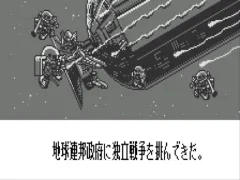
The game loads when you press Play · press “Play Now” inside the game if it asks.
SD Gundam - Emotional Jam (J) [M]
SD Gundam - Emotional Jam
Inside SD Gundam - Emotional Jam
- WonderSwan
- Action
- 5· 0 votes
SD Gundam - Emotional Jam is a Japanese WonderSwan title that brings the chibi-style Mobile Suit Gundam universe to Bandai's handheld. Released exclusively in Japan, it is part of the long-running SD Gundam franchise. The game was published by Bandai, though the specific developer is not widely documented. As a WonderSwan game, it leverages the system's monochrome screen and simple controls, typical of the era's portable releases.
The gameplay in SD Gundam - Emotional Jam involves piloting SD Gundam mechs through stages. Players control a mobile suit, navigating side-scrolling environments, and engaging enemies. The title "Emotional Jam" hints at a focus on rhythmic or combo-based combat, but exact mechanics are not well documented. Like many WonderSwan games, it likely uses the handheld's limited buttons for movement, jumping, and attacking, with simple stage objectives.
For retro collectors, this is a niche curiosity that showcases the Gundam franchise's reach beyond mainstream consoles. It is not a revolutionary title, but it offers a compact, portable Gundam experience from a time when the WonderSwan competed with the Game Boy. If you are a completist or curious about obscure handheld games, it is worth a quick play. Otherwise, its appeal is limited to dedicated fans.
GAME INFO
- Platform
- WonderSwan
- Genre
- Action
- Publisher
- Bandai
- Players
- 1
- Region
- Japan
How to play SD Gundam - Emotional Jam online
After starting the game, you will likely see a title screen in Japanese. Press Start (Enter) to proceed. The main menu probably includes options like "Start Game" or "Continue" (using save data). Since the game is in Japanese, navigate by trial and error: the first option is usually to start a new game. Once in a stage, use the D-Pad to move your SD Gundam left or right. The A button (X key) jumps, and the B button (S key) likely attacks or dashes. Specific stage goals are not explicitly described, but in such games you typically defeat enemies and reach a goal point.
If there is a save feature, it may allow continuing progress. Look for a menu option that shows a save icon or the word "セーブ" (save). Remember that WonderSwan cartridges used battery-backed RAM, so saving is possible but not guaranteed in every title. If you get stuck, consult a fan translation guide online for menu navigation.
CONTROLS
Controls
- Arrow Keys: D-Pad / Movement
- X: A button
- S: B button
- Enter: Start
- V: Sound
SD Gundam - Emotional Jam FAQ
Can players save progress in SD Gundam - Emotional Jam?
Saving capabilities are not widely documented, but many WonderSwan games utilized battery-backed SRAM for save data. It is possible that SD Gundam - Emotional Jam includes a save function accessible from the pause menu or between stages.
Is SD Gundam - Emotional Jam exclusive to WonderSwan or did it appear on other systems?
This game appears to be exclusive to the WonderSwan handheld. There are no confirmed ports to other platforms, making it a unique entry in the SD Gundam series.
Does SD Gundam - Emotional Jam have a multiplayer or co-op mode?
Multiplayer functionality has not been reported for this title. Most WonderSwan SD Gundam games were single-player experiences, and there is no evidence of link cable support or cooperative play.
You may also like
All WonderSwan games Digimon Adventure 02 - D1 Tamers
 Alchemist Marie & Elie - Futari no Atelier
 Dragonball
 Uchuu Senkan Yamato
 Hunter X Hunter - Greed Island
 Pocket Fighter
 Digimon Digital Monsters - Anode & Cathode Tamer - Veedramon Version
 Puzzle Bobble
 Digimon Tamers - Brave Tamer
 Digimon Tamers - Digimon Medley
 From TV Animation - One Piece - Niji no Shima Densetsu
 Rockman EXE WS
GAME INFO
- Platform
- WonderSwan
- Genre
- Action
- Publisher
- Bandai
- Players
- 1
- Region
- Japan
COMMENTS (0)
No comments yet. Be the first to share your thoughts.