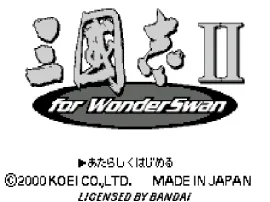
The game loads when you press Play · press “Play Now” inside the game if it asks.
Rekishi Simulation Sangokushi II (J) [M]
Rekishi Simulation Sangokushi II
Rekishi Simulation Sangokushi II on WS
- WonderSwan
- Strategy
- 5· 0 votes
GAME INFO
- Platform
- WonderSwan
- Genre
- Strategy
- Publisher
- Koei
- Developer
- Koei
- Released
- 2000
- Players
- 1
- Region
- Japan
How to play Rekishi Simulation Sangokushi II online
Getting Started
Since this is a Japanese-only release, the menus are entirely in kanji and kana. When you boot the game, you'll see a title screen. Press Start (Enter) to advance. The main menu offers options like starting a new game, loading a save, or adjusting settings - the save feature is particularly useful on a handheld. Newcomers should pick a scenario with a well-known faction, such as Cao Cao or Liu Bei, to ease into the complex mechanics.
The core loop revolves around taking turns managing your kingdom. Each turn you issue orders: recruit generals, develop agriculture, build up your army, declare war, or form diplomatic alliances. After you finalize orders, the AI for other factions moves. Battle sequences are automated but show unit movements on a tactical map. The goal is to unify all of China under your rule by conquering every rival state.
Pay close attention to your officers' loyalty and your treasury. If you run out of gold, troops may desert. The WonderSwan's small screen means menus are dense but functional - you can cycle through options with the D-pad and confirm with X. There is no in-game tutorial, so expect a steep learning curve if you're new to Koei's sim style. Consider reading a translation guide online for the menu options before jumping in.
CONTROLS
Controls
- Arrow Keys: D-Pad / Movement
- X: A button
- S: B button
- Enter: Start
- V: Sound
Rekishi Simulation Sangokushi II FAQ
Is Rekishi Simulation Sangokushi II considered easy to pick up or challenging?
Like most Koei grand strategy games from this era, it demands patience and a willingness to learn dense mechanics. The Japanese menus add an extra layer of difficulty if you don't read the language. Beginners may struggle initially, but the core turn-based flow is logical once you memorize the menu layout.
Is Rekishi Simulation Sangokushi II exclusive to WonderSwan or did it appear on other systems?
This specific portable version was developed solely for the Bandai WonderSwan. The Sangokushi series itself spans many platforms, but this exact numbered sequel (II) on WonderSwan is not a direct port of any console release - it was built for the handheld's hardware limitations.
Is Rekishi Simulation Sangokushi II an official release, a fan hack, a prototype, or another kind of build?
It is an official commercial release, published by Koei in Japan around 2000. The "[M]" in the filename likely stands for "Misc" or "Multilingual" in the romset naming convention, not a mod or hack. The game cartridge was sold in retail stores for the WonderSwan.
You may also like
All WonderSwan games Digimon Adventure 02 - D1 Tamers
 Alchemist Marie & Elie - Futari no Atelier
 Dragonball
 Uchuu Senkan Yamato
 Hunter X Hunter - Greed Island
 Pocket Fighter
 Digimon Digital Monsters - Anode & Cathode Tamer - Veedramon Version
 Puzzle Bobble
 Digimon Tamers - Brave Tamer
 Digimon Tamers - Digimon Medley
 From TV Animation - One Piece - Niji no Shima Densetsu
 Rockman EXE WS
GAME INFO
- Platform
- WonderSwan
- Genre
- Strategy
- Publisher
- Koei
- Developer
- Koei
- Released
- 2000
- Players
- 1
- Region
- Japan
COMMENTS (0)
No comments yet. Be the first to share your thoughts.