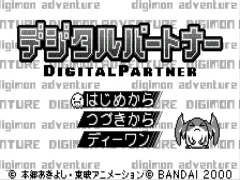
The game loads when you press Play · press “Play Now” inside the game if it asks.
Digital Partner (J) [M]
Digital Partner
Inside Digital Partner
- WonderSwan
- Simulation
- 5· 0 votes
Digital Partner (J) [M] is a WonderSwan game released exclusively in Japan. Its exact release year and developer are not widely documented, but it belongs to the generation of handheld titles from Bandai's WonderSwan platform. The "[M]" suffix in the title may indicate a specific version or edition, though details remain unclear.
The game appears to center on raising or interacting with a digital companion, a concept popularized by virtual pet simulators. Players likely manage the partner's needs through simple inputs on the WonderSwan's d-pad and buttons. The exact mechanics, such as feeding, playing, or training, cannot be confirmed without verified documentation, but the genre conventions suggest a simulation-oriented loop.
For collectors of obscure handheld games, Digital Partner represents one of many niche digital pet experiments on the WonderSwan. Its appeal today lies more in historical curiosity than polished gameplay. If you enjoy exploring forgotten Japanese titles with a simple premise, it may be worth a brief look.
GAME INFO
- Platform
- WonderSwan
- Genre
- Simulation
- Players
- 1
- Region
- Japan
How to play Digital Partner online
Since Digital Partner is a Japan-exclusive title, the menus are entirely in Japanese. When you start the game, you will likely see a title screen and then a menu for selecting a new game or continuing. Experiment with the A button (X key) to enter menus and the B button (S key) to back out.
The core loop involves interacting with your digital companion through a series of status screens. You may need to feed, clean, or play with the partner to keep it healthy. Without a translation, you can rely on trial and error to learn what each icon does. Pay attention to any changes in the partner's appearance or mood as a guide.
If the game includes minigames, try pressing the A or B buttons during prompts. The D-pad likely controls movement within a small environment. Save progress if available by selecting the save option from the menu before turning off the emulator.
CONTROLS
Controls
- Arrow Keys: D-Pad / Movement
- X: A button
- S: B button
- Enter: Start
- V: Sound
Digital Partner FAQ
Who developed Digital Partner?
The development studio for Digital Partner is not widely documented in English-language sources. It may have been produced by a smaller Japanese studio during the WonderSwan's lifecycle.
What makes Digital Partner stand out among WonderSwan titles of its era?
Without confirmed details, it is difficult to pinpoint unique features. The game is notable for its enigmatic "M" suffix and its focus on digital companionship, a genre rarely seen on the WonderSwan.
Is Digital Partner exclusive to WonderSwan or did it appear on other systems?
Digital Partner appears to be exclusive to the WonderSwan. There are no known ports or re-releases on other platforms.
You may also like
All WonderSwan games Digimon Adventure 02 - D1 Tamers
 Alchemist Marie & Elie - Futari no Atelier
 Dragonball
 Uchuu Senkan Yamato
 Hunter X Hunter - Greed Island
 Pocket Fighter
 Digimon Digital Monsters - Anode & Cathode Tamer - Veedramon Version
 Puzzle Bobble
 Digimon Tamers - Brave Tamer
 Digimon Tamers - Digimon Medley
 From TV Animation - One Piece - Niji no Shima Densetsu
 Rockman EXE WS
GAME INFO
- Platform
- WonderSwan
- Genre
- Simulation
- Players
- 1
- Region
- Japan
COMMENTS (0)
No comments yet. Be the first to share your thoughts.