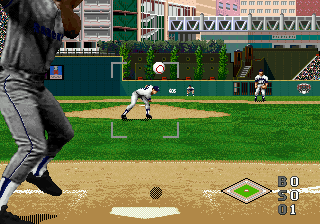
The game loads when you press Play · press “Play Now” inside the game if it asks.
World Series Baseball Starring Deion Sanders (USA)
World Series Baseball Starring Deion Sanders
World Series Baseball Starring Deion Sanders - Sports Classic
GAME INFO
- Platform
- SEGA 32X
- Genre
- Sports
- Developer
- BlueSky Software
- Released
- 1995
- Players
- 1-2
- Region
- USA
How to play World Series Baseball Starring Deion Sanders online
Getting Started
When you first fire up World Series Baseball Starring Deion Sanders, you'll see a main menu with options like Exhibition, Season, and Options. Pick a mode - Exhibition lets you jump straight into a single game. You'll choose a team from the available MLB squads, then get set for nine innings of play. The game uses the standard baseball rules, so the goal is to outscore your opponent by hitting runs and preventing them from scoring.
At bat, use the d-pad to aim your swing and press the A button (X on keyboard) to swing. Timing matters more than aiming; watch the pitch speed and release point. When pitching, select a pitch type with the d-pad and press A to throw. You can aim the pitch by moving the cursor before throwing. Fielding is automatic when the ball is hit, but you control the player closest to the ball and use the d-pad to run toward it, then press B (S on keyboard) to throw to a base.
Key things to know: The computer AI is decent but not overpowered, so you can win with patient batting and smart pitching. Pay attention to the batter's timing - if you swing early or late, the ball goes foul or is missed entirely. There's no save function in the basic emulated version, so plan your sessions accordingly. The season mode lets you play a full schedule, but results won't persist once you close the browser.
CONTROLS
Controls
- Arrow Keys: D-Pad / Movement
- X: A button
- S: B button
- Z: C button
- A: X button (6-button pad)
- Q: Y button (6-button pad)
- E: Z button (6-button pad)
- Enter: Start / Mode
World Series Baseball Starring Deion Sanders FAQ
Is World Series Baseball Starring Deion Sanders exclusive to SEGA 32X or did it appear on other systems?
The game was released only for the Sega 32X and never saw a port to other platforms. It is one of the few exclusive sports titles on that add-on hardware.
In what year was World Series Baseball Starring Deion Sanders originally released?
It originally came out in 1995, near the end of the 32X's short lifespan. The exact month is not widely documented, but the year is confirmed by Sega's release records.
Who developed World Series Baseball Starring Deion Sanders?
The development studio is not widely documented in standard sources. Sega published the game, but the internal team or external developer is unclear.
You may also like
All SEGA 32X games


GAME INFO
- Platform
- SEGA 32X
- Genre
- Sports
- Developer
- BlueSky Software
- Released
- 1995
- Players
- 1-2
- Region
- USA
COMMENTS (0)
No comments yet. Be the first to share your thoughts.