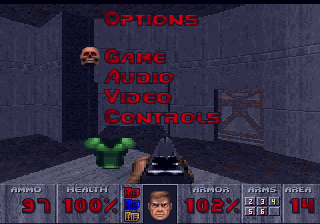
The game loads when you press Play · press “Play Now” inside the game if it asks.
Doom 32X Resurrection v2.2b
Doom 32X Resurrection v2.2b
Inside Doom 32X Resurrection v2.2b
Unofficial ROM hack. The notes below come from community sources and have not been verified against the patch itself, so levels, mechanics and features may differ from what is described.
GAME INFO
How to play Doom 32X Resurrection v2.2b online
Getting Started
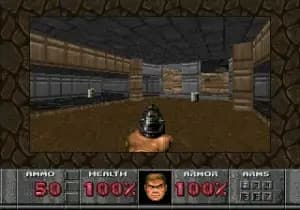
When you start Doom 32X Resurrection v2.2b, you'll see a menu. Use the D-Pad (Arrow Keys) to navigate and press X (A button) to confirm. Choose "New Game" to begin. You start with a pistol and some ammo in the first level, Hangar. The goal is to find the exit while blasting every demon in your way.
The core loop is simple: explore the level, find colored keys (red, yellow, blue) to open corresponding doors, and survive the monster hordes. Keep an eye on your health and ammo - pistol ammo is scarce, so use the shotgun and chaingun when you find them. The hack improves enemy hit detection and level geometry, so you'll notice fewer invisible walls compared to the original 32X port.
Press Start (Enter) to pause, and Select (V) to toggle the automap in some versions. If you get lost, the automap can help you find where keys or exits are. Don't be afraid to strafe (use the D-Pad left/right while holding B button) to dodge enemy fire. It's all about movement and quick reflexes.
CONTROLS
Controls
- Arrow Keys: D-Pad / Movement
- X: A button
- S: B button
- Z: C button
- A: X button (6-button pad)
- Q: Y button (6-button pad)
- E: Z button (6-button pad)
- Enter: Start / Mode
Doom 32X Resurrection v2.2b FAQ
Is there anything iconic or memorable about Doom 32X Resurrection v2.2b?
It's widely regarded as the definitive fan improvement of the notoriously rough original Doom 32X port. The hack restores missing visual effects, fixes broken level geometry, and even adds cut content like sound effects and enemy placements. For many, it represents what the commercial release should have been.
Which regions was Doom 32X Resurrection v2.2b released in?
Being a fan-made hack, it has no official regional release. It was distributed online and is playable anywhere via emulation or flash cart on real hardware. There's no region locking involved.
Who developed Doom 32X Resurrection v2.2b?
The creator is not widely documented in the provided context. The hack is known as a community effort, with updates released by various contributors, but the original developer's name is not confirmed in the verified sources.

COMMENTS (0)
No comments yet. Be the first to share your thoughts.