The game loads when you press Play · press “Play Now” inside the game if it asks.
Stellar Assault (Japan)
Stellar Assault
Getting to Know Stellar Assault
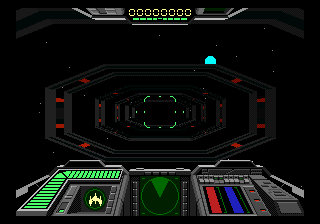
Stellar Assault is a 3D space combat shooter that hit the Sega 32X exclusively in Japan. Published by Sega, it was one of a handful of titles that tried to show off the add-on's polygon-pushing abilities. The game takes full advantage of the 32X hardware to create a first-person cockpit view, putting you directly behind the controls of a starfighter.
You fly through a series of levels filled with enemy fighters, capital ships, and asteroid fields. The core loop involves targeting hostile craft with your reticle, firing lasers, and weaving through debris to avoid collisions. Some stages have you defend larger allied ships or navigate tight corridors. The controls feel responsive for the era, though the frame rate can chug when the screen gets busy.
For retro collectors, Stellar Assault is a neat piece of 32X history. It's not a deep game, but it captures the arcade-style intensity of mid-90s space shooters. If you want to see what the 32X could do with 3D graphics and own a taste of Japan-only Sega software, it's worth a look. Just don't expect branching paths or a complex story.
GAME INFO
How to play Stellar Assault online
When you boot the game, you'll see a Japanese title screen. Press Enter (Start) to proceed to the menu. The menu items are in Japanese, but the top option typically starts a new game. Use the Arrow Keys to navigate and X to confirm. You can also press V (Select) to adjust options if needed.
Once in the game, you pilot a starfighter in a first-person view. Use Arrow Keys to steer your ship, X to fire primary weapons, and S to use secondary weapons (if you have any). The goal is to destroy all enemies in each stage while avoiding collisions with asteroids and enemy fire. After clearing a stage, you might see a password screen - write down any codes shown to continue later, as the game does not save automatically. The action is fast and arcade-like, so keep moving and shoot everything that moves.
CONTROLS
Controls
- Arrow Keys: D-Pad / Movement
- X: A button
- S: B button
- Z: C button
- A: X button (6-button pad)
- Q: Y button (6-button pad)
- E: Z button (6-button pad)
- Enter: Start / Mode
Stellar Assault FAQ
Who developed Stellar Assault?
Stellar Assault was developed and published by Sega for the Sega 32X. It was a first-party title designed to showcase the add-on's 3D capabilities.
Is Stellar Assault exclusive to SEGA 32X or did it appear on other systems?
The game was exclusive to the Sega 32X and never released on other home consoles or handhelds. There is no known port to any other platform.
Can players save progress in Stellar Assault?
Stellar Assault does not have a built-in save function. After completing a stage, a password is displayed on screen; jot it down to resume from that point later.

COMMENTS (0)
No comments yet. Be the first to share your thoughts.