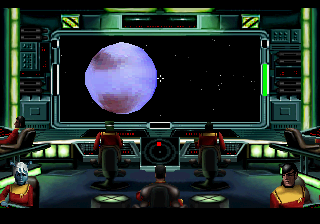
The game loads when you press Play · press “Play Now” inside the game if it asks.
Star Trek Starfleet Academy - Starship Bridge Simulator (USA)
Star Trek Starfleet Academy - Starship Bridge Simulator
About Star Trek Starfleet Academy - Starship Bridge Simulator
- SEGA 32X
- Simulation
- 5· 0 votes
GAME INFO
- Platform
- SEGA 32X
- Genre
- Simulation
- Region
- USA
How to play Star Trek Starfleet Academy - Starship Bridge Simulator online
Getting Started
When you start up Star Trek Starfleet Academy - Starship Bridge Simulator, you'll typically be presented with a menu of missions or scenarios. Choose one to begin. You take the role of a commanding officer on the bridge, and your main job is to issue orders to your crew through the console interface. The core loop involves monitoring ship systems, responding to hails, setting course, and engaging in combat with enemy vessels.
Pay attention to the damage display and crew reports. You'll need to manage shields, weapons, and engine power on the fly. The game plays out in real-time, so staying calm and prioritizing threats is key. If you're new, start with a training or easy mission to get a feel for the controls and interface. There's no pause, so be ready to react quickly.
CONTROLS
Controls
- Arrow Keys: D-Pad / Movement
- X: A button
- S: B button
- Z: C button
- A: X button (6-button pad)
- Q: Y button (6-button pad)
- E: Z button (6-button pad)
- Enter: Start / Mode
Star Trek Starfleet Academy - Starship Bridge Simulator FAQ
Who developed Star Trek Starfleet Academy - Starship Bridge Simulator?
The developer for the Sega 32X version is not widely documented. The original PC release was handled by Interplay Productions, but whether they directly ported it to the 32X isn't confirmed.
What makes Star Trek Starfleet Academy - Starship Bridge Simulator stand out among SEGA 32X titles of its era?
It's one of the few simulation games on the 32X, offering a more strategic and atmospheric experience compared to the action-heavy shooters and platformers that dominated the library. The licensed Star Trek setting also gives it a unique flavor.
What type of game is Star Trek Starfleet Academy - Starship Bridge Simulator?
It is a simulation game where you command a starship from the bridge. You issue orders to crew members, manage ship systems, and participate in combat and diplomatic encounters.
You may also like
All SEGA 32X games
GAME INFO
- Platform
- SEGA 32X
- Genre
- Simulation
- Region
- USA
COMMENTS (0)
No comments yet. Be the first to share your thoughts.